
Choose CapCut when your priority is precise cuts, keyframes and deliberate visual polish; consider TokMax AI when connecting scripts, generation, a content calendar and scheduling is the bigger problem. TokMax's advertised $37 entry includes 10,000 one-time credits, not unlimited AI production, while CapCut offers free editing and paid plans with separate AI allowances. Our provisional TokMax assessment remains 7.4/10: the connected workflow is promising, but the buying decision depends on live offer terms, actual credit consumption and authorized public TikTok publishing.
Documentation-based comparison, not a timed head-to-head production test. TikTok API requirements do not certify TokMax's implementation.TokMax AI: Check the $37 Launch Offer
Advertised $37 one-time with 10,000 one-time credits. Consider it for a connected faceless-content workflow, not as a replacement for every editing tool.
Pre-launch availability: vendor materials point to October 12, 2026, while the public offer listing gives October 15. Confirm that the sales page and checkout are live before buying.
Check TokMax AI Launch Availability →Quick Comparison Matrix
The useful question is not which brand has more AI claims. It is whether your main bottleneck is editing a better video or moving approved content through a repeatable production and publishing process.
| Decision Factor | TokMax AI | CapCut |
|---|---|---|
| Learning Curve | Connected stages may reduce tool-switching; verify setup and account authorization | Quick template starts; advanced timeline and keyframe work takes practice |
| Scripting | Vendor advertises hooks and scripts from topics and other inputs | AI script-to-video tools are available; not a manual-only editor |
| Automation Speed | Advertised concept-to-schedule pipeline; no verified speed benchmark | AI assembly and templates accelerate drafts; refinement remains a creative task |
| Precision Editing | Built-in editor advertised; no established parity with CapCut's keyframes | Multi-track timeline, trimming and keyframes for controlled finishing |
| Scheduling | Calendar and scheduling advertised; confirm plan limits and API approval | Direct TikTok sharing exists in supported workflows; not proof of an equivalent batch calendar |
| Pricing Model | $37 advertised one-time entry; 10,000 one-time credits; future usage costs unresolved | Free tier; official reference Pro price $19.99/month at this check; checkout varies |
Our recommendation: CapCut for precision-first production; TokMax as a conditional shortlist for an integrated pipeline. The table separates documented CapCut capabilities from TokMax's advertised launch workflow. For the full product assessment, read our TokMax AI Main Review.
TokMax AI: For Pipeline-Oriented Creators
Check the advertised $37 Creator offer. Choose around repeatable production and scheduling needs.
Before purchase, confirm credit costs, usable exports, connected-account allowances and the refund terms. Agency or multi-account demonstrations do not establish what the entry licence includes.
Check the TokMax AI Creator Offer →At our October 10 check, the existing offer link reached the vendor's sales destination, which returned an error. Use these buttons to recheck availability; the launch price is advertised, not a confirmed open checkout total.
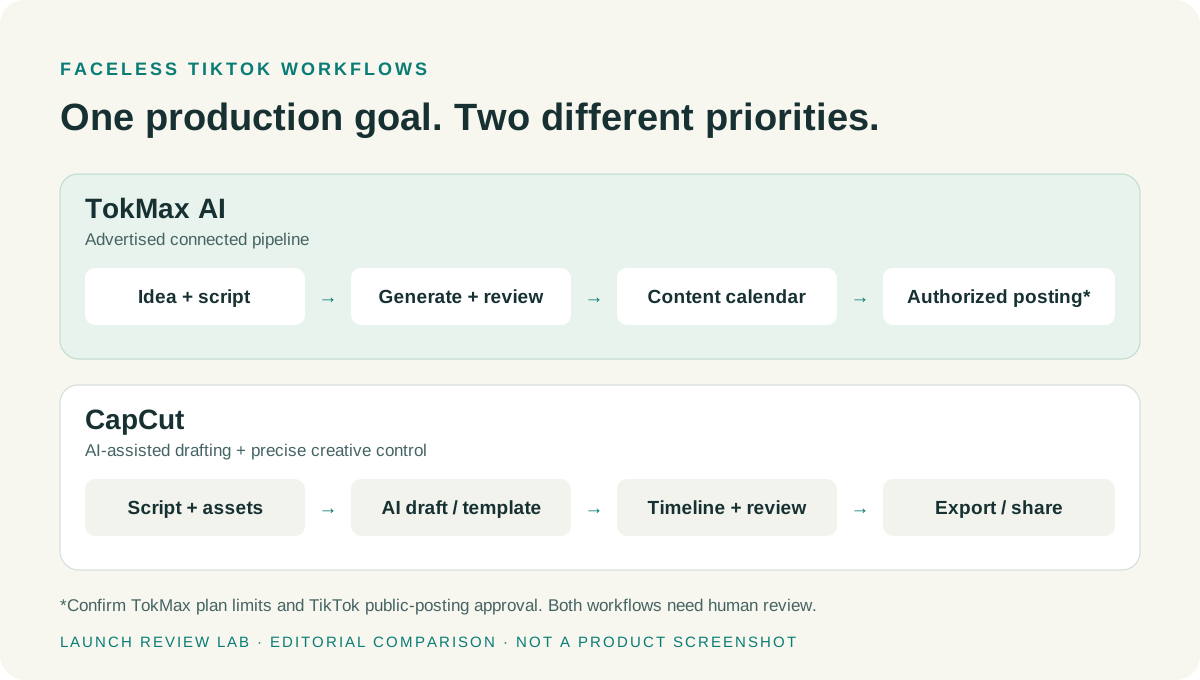
Fundamental Difference: Creative Timeline vs Connected Pipeline
CapCut is a precision-oriented creative workspace. You can work with footage, text, audio and effects across a timeline, then deliberately shape pacing and motion. Its official keyframe documentation describes control over parameters such as position, scale and opacity, with timing adjustments for the intended movement.
TokMax AI is positioned as a concept-to-schedule workspace. The official partner information markets ideas, scripts, AI media, editing, planning and publishing in one connected flow. Its attraction is fewer handoffs between tools—not demonstrated superiority in detailed compositing or frame-accurate finishing.
This distinction is about emphasis, not an absolute feature boundary. CapCut also has AI creation tools, and TokMax advertises an editor. For a focused explanation of TokMax's stages rather than another general tutorial, use our How TokMax AI Works guide.
Head-to-Head: Scripts, Assembly, Voiceovers and Captions
AI Script and Ideation
TokMax advertises topic, keyword and other input routes into hooks and scripts. That can suit an operator turning a defined niche brief into a queue of related clips. Evaluate whether drafts actually fit your audience and whether editing or regenerating them spends credits.
CapCut is not limited to pasting a manually written script. Its official script-to-video tool describes AI writing, script-based assembly and subsequent multi-track refinement. The real comparison is how easily each tool keeps the brief, script and video consistent—not whether only one has AI.
Video Assembly and Automation
TokMax's URL- or keyword-led proposition may reduce initial setup, but a supplied link does not guarantee accurate source interpretation, licensed media or a coherent story. Before using an assembled video, check that the visuals support the narration rather than merely matching isolated keywords.
CapCut combines templates and AI-assisted drafting with a timeline you can refine. It is the stronger documented option when the important work is replacing one shot, shortening a pause or controlling a transition rather than generating another complete draft.
Voiceovers, Captions and Native Languages
TokMax advertises voice and caption stages; CapCut's creation tools also support narration and caption workflows. Compare the actual voice and language available in your plan, not a generic language-count headline.
Use a short sample containing a proper name, number, specialist term and sentence break. Listen for pronunciation and pacing, then check caption timing, line breaks and whether the text stays clear of TikTok's interface. We are not claiming that either product won a measured voice-quality test or supports every dialect equally.
For multilingual channels, ask whether translation, voice generation and caption correction are separate billable actions. An apparently cheap first draft can become expensive when each correction consumes another allowance.
Scheduling and Publishing: What the TikTok API Actually Allows
TokMax advertises a calendar and scheduling flow. The buyer needs to establish whether that means authorized public posting, uploading a draft for completion in TikTok, or a reminder to publish manually. These are materially different workflows.
TikTok's Direct Post setup documentation requires the relevant publishing scope and the creator's authorization. Its Content Sharing Guidelines restrict unaudited clients to private visibility and apply creator- and app-related publishing limits. A vendor's “TikTok integration” claim alone does not prove that its app has passed the public-posting audit.
Before relying on scheduling, ask to see:
- A successful public post from the authorized account, not merely an export or a private upload.
- Time-zone and failure handling: what happens when a token expires, authorization is revoked or a scheduled job fails?
- Account and plan allowances: whether the entry offer supports your number of channels and the necessary client permissions.
- Creator controls: how privacy settings, disclosures and the final content review are preserved.
CapCut's official TikTok editing guide describes direct sharing as well as downloading an export. It would be inaccurate to call every CapCut workflow manual-upload-only. However, a share button is not evidence of the same recurring, multi-account batch calendar TokMax markets; compare the exact version and tools available to you.
Neither app removes your responsibility for content rights or platform rules. TikTok requires labels for realistic AI-generated media in applicable cases; review the official AI-generated content guidance. Music availability in an editing library does not automatically establish commercial rights for every account or use.
Cost and Economics: Subscription vs One-Time Credits
Check the Current CapCut Plan, Not an Old Price
CapCut has a Free tier. At our October 10 check, its official pricing page displayed Pro at $19.99 per month, with monthly AI credits and the option to buy more. The page says final pricing, taxes and offers depend on the signed-in account.
Do not assume a $9.99 mobile quote is the current universal Pro price. Check the actual tier, region and billing period in your account. Compare the displayed annual offer separately; multiplying a monthly subscription by twelve is not a verified annual-plan price. Editing access and AI-generation allowances are also different entitlements.
TokMax's $37 Entry Is Not Unlimited Production
The TokMax entry offer advertises 10,000 one-time credits. That is a finite starting allowance, not a monthly refill. Without a per-action consumption schedule and top-up price, there is no defensible way to convert it into a promised number of finished videos.
A useful budgeting model is: available credits ÷ average credits per approved video. Count scripting, media generation, voiceovers and discarded retries where they are charged. For illustration only, 100 credits per accepted video would imply about 100 videos from 10,000 credits; 500 would imply about 20. Neither assumption is a verified TokMax consumption rate.
Before scaling, establish top-up availability, credit expiry, whether failed jobs are charged and which upgrades your workflow needs. “One-time software payment” does not settle the cost of ongoing AI processing. Our TokMax AI Pricing Guide covers plan boundaries without duplicating the entire upgrade funnel here.
Compare Cost per Approved Video
The economic test includes your review and repair time, not just the sticker price. A connected workflow is valuable if it reduces actual handoffs while producing acceptable exports. A free editor can be the better purchase decision when you need fewer videos and already have a clear script and reusable visual style.
Output Quality: The Checks That Matter Before Scaling
A fast draft is not the same as a publishable video. Use the same brief and intended audience to evaluate pacing, scene relevance, voice clarity, caption accuracy and export quality. If you later compare both products yourself, count accepted outputs, not every generated file, and record the corrections needed.
For faceless content, assess whether the visuals tell a specific story or merely recycle generic footage. Check the opening hook against the actual subject, remove invented factual claims and confirm that narration remains understandable without the visuals. For captions, inspect a phone-sized preview, not just a large desktop canvas.
Confirm resolution, watermark rules, export rights and any restrictions on stock media or generated assets before buying. TokMax's launch demonstrations do not establish identical quality across every template and plan; CapCut's flexibility does not make every template distinctive.
CapCut's timeline is especially useful when exact cuts, motion timing or audio alignment determine the final result. TokMax's proposed advantage is organizational: retaining the script, production status and intended publishing slot together. Neither advantage guarantees reach, monetization or a profitable channel.
Final Recommendation: Choose Around Your Production Bottleneck
Choose CapCut if you prioritize polished, hand-crafted visuals, precise trimming, keyframes and carefully timed audio. Start with the free tools that cover your actual needs, then evaluate paid features in the current CapCut plans. Check music rights before using trending sounds commercially.
Consider TokMax AI if you have a defined faceless-content niche and want scripts, generation, a calendar and scheduling connected in one dashboard. For multiple channels or client work, confirm the necessary licence, account allowances and public-posting authorization first; do not assume the $37 entry includes every agency capability.
A hybrid workflow may also make sense: draft and organize in TokMax, polish an exported video in CapCut, then publish through the appropriate authorized workflow. Confirm export compatibility and whether edited files can re-enter TokMax's schedule before treating that handoff as seamless.
Our provisional 7.4/10 TokMax perspective is unchanged. It is a promising workflow proposition, not a generic CapCut replacement. Check the live offer and credit economics before purchasing; if your immediate need is precision editing, CapCut is the clearer starting point today.
Check TokMax AI Availability and Terms →Frequently Asked Questions
Can TokMax AI replace CapCut completely?
Not for every creator: TokMax is positioned around a connected creation-to-scheduling workflow, while CapCut provides documented timeline and keyframe controls for detailed editing. There is no established evidence here that TokMax matches all of CapCut's precision tools. Choose based on the editing and publishing tasks you actually need, or verify an export-and-polish hybrid workflow.
Does TokMax AI post directly to TikTok without opening the app?
The vendor advertises scheduling, but public direct posting depends on TikTok authorization, required publishing scopes and the app's approval status. An unaudited integration can be restricted to private visibility, and draft upload may still require action in TikTok. Ask for proof of the exact public-posting flow and confirm account limits before relying on unattended publishing.
What happens when the 10,000 TokMax AI credits run out?
The advertised entry credits are one-time, not a confirmed monthly refill. Further credit-consuming work would require whatever top-up or upgraded allowance the vendor actually makes available; consumption rates, expiry and replenishment prices remain checks to complete before purchase. Do not interpret the one-time entry price as unlimited ongoing generation.
Is there a money-back guarantee for TokMax AI?
We have not confirmed an applicable TokMax refund duration and conditions from a live purchase checkout for this comparison. Read the exact offer's refund policy, request procedure and exclusions before paying, and retain the checkout terms. Do not infer a 30-day guarantee from another product or assume that every upgrade has identical terms.