
ClickDesigns X is worth considering when your course needs a coordinated set of covers, workbook previews and product mockups rather than another disconnected collection of images. We found ClickDesigns easy and practical; for educators, its strongest potential is making the relationship between lessons, downloadable resources and bonuses immediately clear. Start with Core only after checking that your required templates and exports are included, and consider the Complete Bundle when advanced 3D or recurring client-launch work justifies the additional cost. Clear visuals can support perceived value, but better mockups do not automatically increase course sales. Your curriculum, evidence, audience fit, sales copy and learner outcomes still carry the offer.
A qualitative assessment of course-marketing fit—not a measured conversion lift or a benchmark of every X upgrade.Quick Action: Check the Core Launch Offer
Advertised entry: $37 one-time. A focused starting point for a solo educator preparing course covers and promotional assets.
The public launch is scheduled for October 13, 2026. At our October 10 check, this link opened the vendor's webclass registration, not an available purchase checkout.
Check the ClickDesigns X Core Launch Offer →Course Creator ROI Check
Before buying, identify one launch pack you actually need: a course hero graphic, a workbook presentation and a reusable lesson-thumbnail style. Compare the software price plus your editing time with a written quote for those same deliverables—not with an inflated estimate for an entire custom brand identity.
The launch schedule and advertised pricing come from the official ClickDesigns X launch information. Confirm the actual checkout terms when sales open.
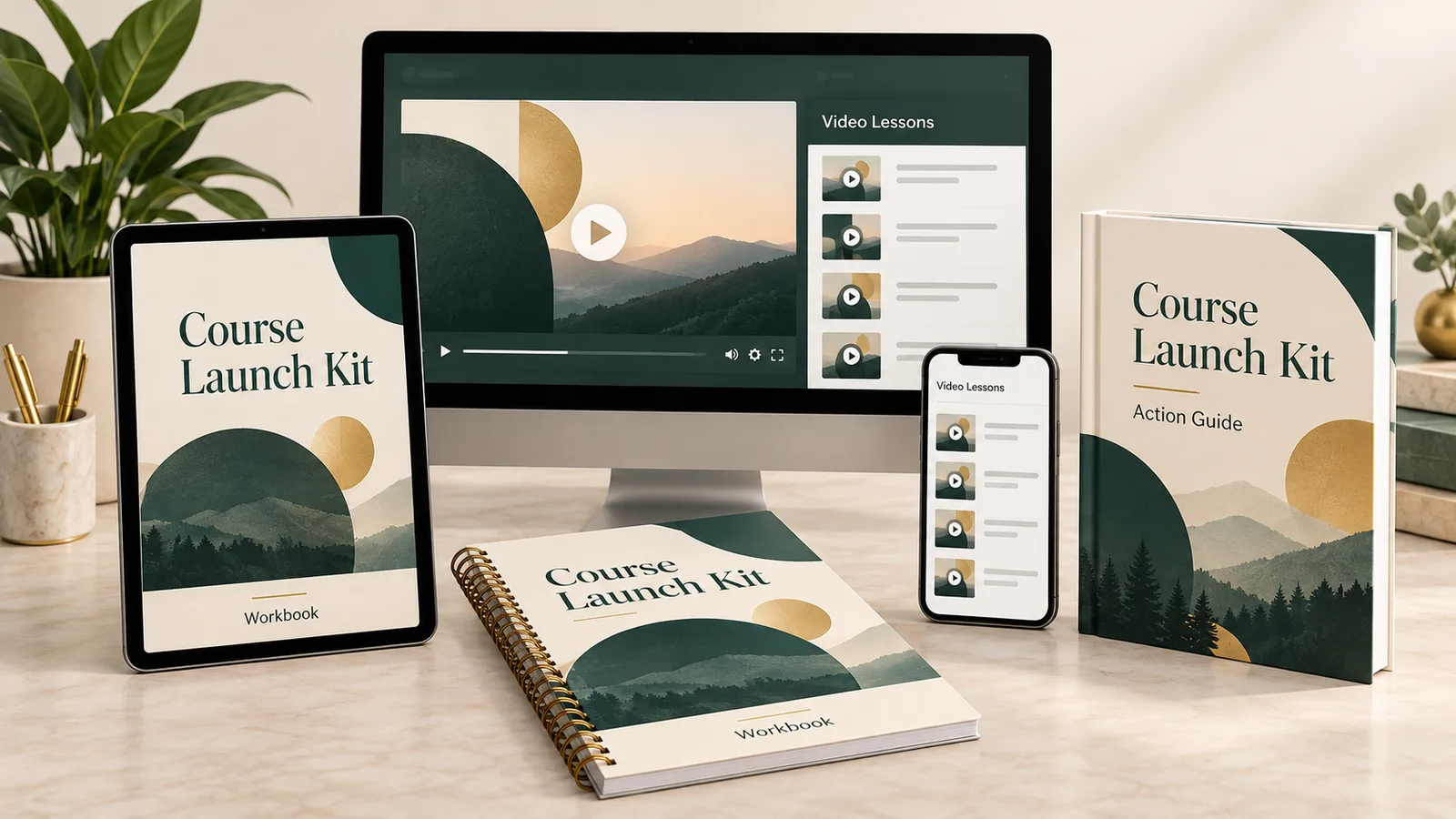
The Perceived Value Gap in Course Marketing
A sales page that says “videos plus PDFs” leaves visitors to imagine what they receive. That is a presentation problem—not evidence that plain PDFs or simple course portals cannot sell at premium prices.
A useful course graphic answers three questions: What will I learn? What resources support the lessons? How will I access them? A desktop lesson preview, a tablet workbook and clearly named bonus materials can make those answers more concrete.
Keep the hierarchy honest. Make the main course visually dominant, place supporting resources beside it and distinguish optional bonuses from the core curriculum. Do not turn one PDF into five apparent products by showing the same file on several devices without explanation.
For a coaching offer, separate recorded lessons, worksheets and live sessions. A polished box graphic does not communicate the number of coaching calls, access duration or whether personal feedback is included; state those details in readable text.
The Three Essential Course Asset Workflows
These are course-production briefs, not instructions promising that every illustrated template is included in Core. For the broader editor process, read our ClickDesigns X Workflow & Feature Guide.
Workflow 1: Build the Master Course Stack
Goal: Create one clear visual explaining the course and its supporting materials.
Start with your real deliverables. For example, a hypothetical “Course Launch Kit” could contain video lessons, a PDF workbook and a launch checklist. Prepare a genuine lesson screenshot and the actual resource covers before assembling their promotional presentation.
Build the stack around three roles:
- Main course: A desktop or laptop presentation showing the actual lesson experience.
- Learning support: A workbook cover displayed separately from the videos.
- Bonus resource: A smaller checklist or action-guide presentation with its real title.
Use one title system, colour palette and type hierarchy. If a phone appears in the stack, it should communicate actual mobile access or an appropriately labelled example—not imply a native app that does not exist.
Check the available device and book layouts before choosing your composition. The official X launch document distinguishes the core mockup offering from the expanded animated and interactive 3D capabilities; do not assume every demonstration belongs to the entry plan.
Deliverables: A sales-page hero, a simpler checkout image and a mobile-friendly version. Keep only the main course and its most important supporting resource in the smallest version so the titles remain legible.
Workflow 2: Present Workbooks, Checklists and Action Guides
Goal: Help prospective students understand the resource's job, not just admire its cover.
Create the actual PDF content first in an appropriate document or layout tool. ClickDesigns should not be treated as proof that exercises, links, worksheets or fillable fields are complete.
Use the resource's real title and show a representative interior page beside its cover. For a workbook, that might be a goal-setting exercise; for a checklist, the actual action list; for an implementation guide, a genuine planning page.
A spiral-bound or hardcover presentation can make the resource easier to recognize if a suitable template is available in your licence. Label it “downloadable PDF” or “printable workbook” when no physical book is shipped.
Keep two separate outputs:
- Student file: The readable, usable PDF, including any genuine links or form fields.
- Marketing image: The cover or mockup used on your course page, Gumroad listing or email.
Before delivery, open the PDF on desktop and mobile, inspect small text and test printing where relevant. A beautiful mockup cannot repair a worksheet that is difficult to use.
Workflow 3: Create LMS Thumbnails and Sales Badges
Goal: Build a recognizable course library without shrinking a complicated bundle stack into every lesson card.
Design a simpler thumbnail system: short module title, consistent background and one distinguishing visual. Keep essential text away from the edges so cropping does not remove it.
For Teachable, current guidance recommends course thumbnails at 1024 × 576 pixels, 16:9. Kajabi accepts uploaded product and course images and may require field-specific crops; inspect the destination rather than assuming one size fits everything. Teachable thumbnail guidance, Kajabi Media Library guidance.
For Skool or a Gumroad course listing, check the current upload requirements in your account, then export for that placement. This is an image-upload workflow, not a verified native ClickDesigns integration with those platforms.
Use badges only for accurate information: “PDF Workbook Included,” “Recorded Lessons” or an actual access period. Avoid invented accreditation, fake student ratings, unsupported scarcity and guarantees your offer does not provide.
Final check: Preview the uploaded image in the real dashboard and on a phone. The editor preview alone cannot reveal platform cropping or compression.
ClickDesigns X vs Canva for Digital Products
Canva is a useful choice for slides, flat workbook covers and everyday course content. It also offers book and device mockups, so the distinction is not that Canva cannot create product presentations. Canva's official mockup tools.
ClickDesigns X is more specifically positioned around commercial graphics and product packaging. The decision is whether its included templates make your recurring course-launch assets easier to produce—not whether another tool is incapable of the job.
If Canva already handles your presentation needs, keep it. If you regularly assemble course stacks, cover families and sales assets, compare a representative project in each tool. We preferred ClickDesigns for ease and practicality, but that does not establish a timed advantage for every educator.
Read our ClickDesigns X vs Canva comparison for the broader buying decision.
Cost-Benefit Breakdown for Course Creators
Use a Real Design Brief, Not a Universal Fiverr Price
Suppose you receive a $150–$300 quote for one course-launch bundle. Those are illustrative budgeting figures, not a verified marketplace average or a guaranteed price for equivalent work.
Against that hypothetical quote, the advertised $37 Core entry is $113–$263 less before your own labour. But the comparison only works if Core covers the deliverables, export quality is adequate and you do not subsequently need an upgrade or paid designer.
The larger package needs a stronger case. A $397 bundle—or $297 if the announced discount is accepted—does not automatically save money against one $150 commission. Consider it for repeated launches or capabilities you already know you need.
Core vs Complete Bundle: Course-Creator Summary
Choose the smallest package that covers your actual course assets. Compare the included mockups, export options and client permissions before committing to a larger package.
| Offer | Advertised One-Time Launch Price | Course-Creator Buying Check | Best Fit |
|---|---|---|---|
| Front-End / Core | $37; confirm checkout | Confirm your cover, workbook and device templates, exports and commercial-use terms | One educator producing a focused first launch pack |
| Complete Bundle | $397; potentially $297 with the announced $100 discount | Confirm the expanded 3D, production and agency capabilities you actually need | Repeated launches or established client-course work |
These are advertised figures, not confirmed live purchase totals. We have not established a $47 entry tier for this launch or fresh acceptance of the announced bundle discount. For the complete plan boundaries, read our ClickDesigns X Pricing Guide.
Core: Start with One Course Launch Pack
Advertised $37 one-time. Best considered when you have a finished course and need a defined set of covers and promotional graphics.
Check the exact templates and export options before buying. Do not choose Core on the assumption that all animated or interactive demonstrations are included.
Check Core Availability and Inclusions →Complete Bundle: For Recurring Course Production
Advertised $397 one-time; $297 only if the announced discount applies. Consider it when additional 3D capabilities or client-launch management solve repeated work.
Confirm included licences, usage limits, client permissions and applicable refund terms. A larger package is not automatically the best purchase.
Check the Complete Bundle Launch Offer →As checked October 10, both existing offer links opened the vendor's webclass registration, not a confirmed live checkout. Use the buttons to check availability; pricing and discount acceptance must be confirmed when sales open.
Limitations Course Creators Should Know
Layered browser projects need a representative test. Multi-device compositions can involve several images, shadows and high-resolution covers. Save versions and test export quality on your own device; we are not reporting measured X rendering delays.
Templates have creative boundaries. A prebuilt mockup may not match an unusual binder, exact book dimensions or a bespoke illustration brief. Verify specialist requirements such as editable vector delivery instead of assuming a browser editor replaces every Photoshop or Illustrator workflow.
A mockup is not a student deliverable or LMS. It does not host lessons, manage enrolments, generate a working fillable PDF or prove that mobile playback works. Those jobs remain with your actual course-production and delivery tools.
Licensing and plan coverage matter. Check rights for stock assets, fonts, client delivery and redistribution. Advanced 3D demonstrations and broad platform marketing do not establish every Core entitlement.
Check the official export documentation, transparent-image tools and X launch document for the documented formats and advertised licence and refund terms.
Final Verdict: Choose Around the Course You Are Launching
For a solo course creator: Start with Core if its verified inclusions cover your first course hero, workbook presentation and lesson-thumbnail system. Review the actual exports in your course platform before expanding your design workload.
For coaches: Make the boundary between recorded content, downloadable resources and live support especially clear. Invest in a repeatable visual family rather than a large stack of decorative boxes.
For agencies: Consider the Complete Bundle only when several capabilities support recurring client launches. Confirm client access, handover rights and whether the purchased licence covers your service model.
Our recommendation is straightforward: use ClickDesigns to make a real course easier to understand, not to make a weak offer look bigger than it is. That is the practical value behind our 8.7/10 course-creator utility assessment.
For the broader product evaluation, read our ClickDesigns X Review.
Check the Core Offer for Your Next Course Launch →Frequently Asked Questions
Can I export mockups with transparent backgrounds as PNG files?
ClickDesigns documentation lists PNG export and separately describes transparent-image tools, but that does not establish transparent export for every X mockup or launch plan. Confirm the relevant export setting and test your selected template on both light and dark backgrounds. If transparency is unavailable, use a background that matches the page rather than promising a capability your licence does not provide.
Are the templates compatible with Skool, Kajabi and Teachable?
An exported image can be used where the platform accepts that file type, size and aspect ratio, but a ClickDesigns template is not an installable LMS theme or a verified native integration. Export for the specific thumbnail, cover or page placement and preview the uploaded result on desktop and mobile. Platform cropping and upload limits can differ, so check the current requirements rather than using one universal canvas.
Can I sell courses using these designs commercially without royalty issues?
The X launch documentation advertises a Commercial Licence, but it is not a blanket promise that every font, stock image or underlying template has unrestricted resale rights. Check asset-specific permissions and the terms for your own course, client delivery and redistribution. Selling a course with a promotional design is different from reselling the original template or stock asset as a standalone product.
What is the refund policy?
The official X launch document advertises a 30-day money-back guarantee for the front-end offer. Confirm the conditions, request procedure and coverage for the exact offer purchased, particularly the Complete Bundle or upgrades. Keep your order confirmation and deadline; we have not tested refund execution.