
EverPitch guide
How EverPitch Works: From Source Material to an Evergreen Webinar
EverPitch is described as turning a topic or existing material into a webinar script, slides and AI narration. Users can review the material, prepare registration and an offer, then schedule an evergreen presentation for viewers. The presentation is prepared in advance; the seller says it identifies itself as evergreen.
Published November 12, 2026

This guide explains how EverPitch works according to the supplied product information. For package comparisons and a broader buyer assessment, see the EverPitch review.
The EverPitch workflow at a glance
The seller describes a sequence that starts with material you provide and ends with a scheduled presentation. It combines content preparation with registration and delivery tools, but users remain responsible for reviewing the finished material and attracting an audience.
From source material to a scheduled session
- Choose an input
Start with a prompt, guided form, document, sales-page link or recording.
- Review the draft
Check and edit the generated script and slides, then review the AI narration.
- Prepare the event
Apply branding, choose registration, add an offer and schedule the webinar.
- Share and deliver
Share a link or embed a join button for the prepared evergreen session.
This sequence summarizes the seller’s description. The supplied information does not establish every screen, button or configuration option, so verify details that are essential to your setup in the current interface.

Choose a prompt, document, sales page or recording
EverPitch’s seller lists several ways to start: a written prompt, guided form, document, sales-page link or recording. The appropriate input depends on the material you already have and what you want the webinar to explain. A concise topic may help frame a new presentation; an existing document or recording may provide source material to review and adapt.
The seller says prompt-based webinars can run approximately five to 60 minutes. Recording uploads can be up to 2 GB, and a recording can be played in full or used to create a shorter version. The supplied evidence does not specify every supported recording format or establish how closely a shortened version will preserve the original emphasis.
Before submitting material, identify the audience, intended message and offer. Check that you have the necessary permission to use any source content, and consider whether the source contains information you intend to share with a connected service. The seller’s product description outlines the available inputs.
Review the script, slides and AI narration
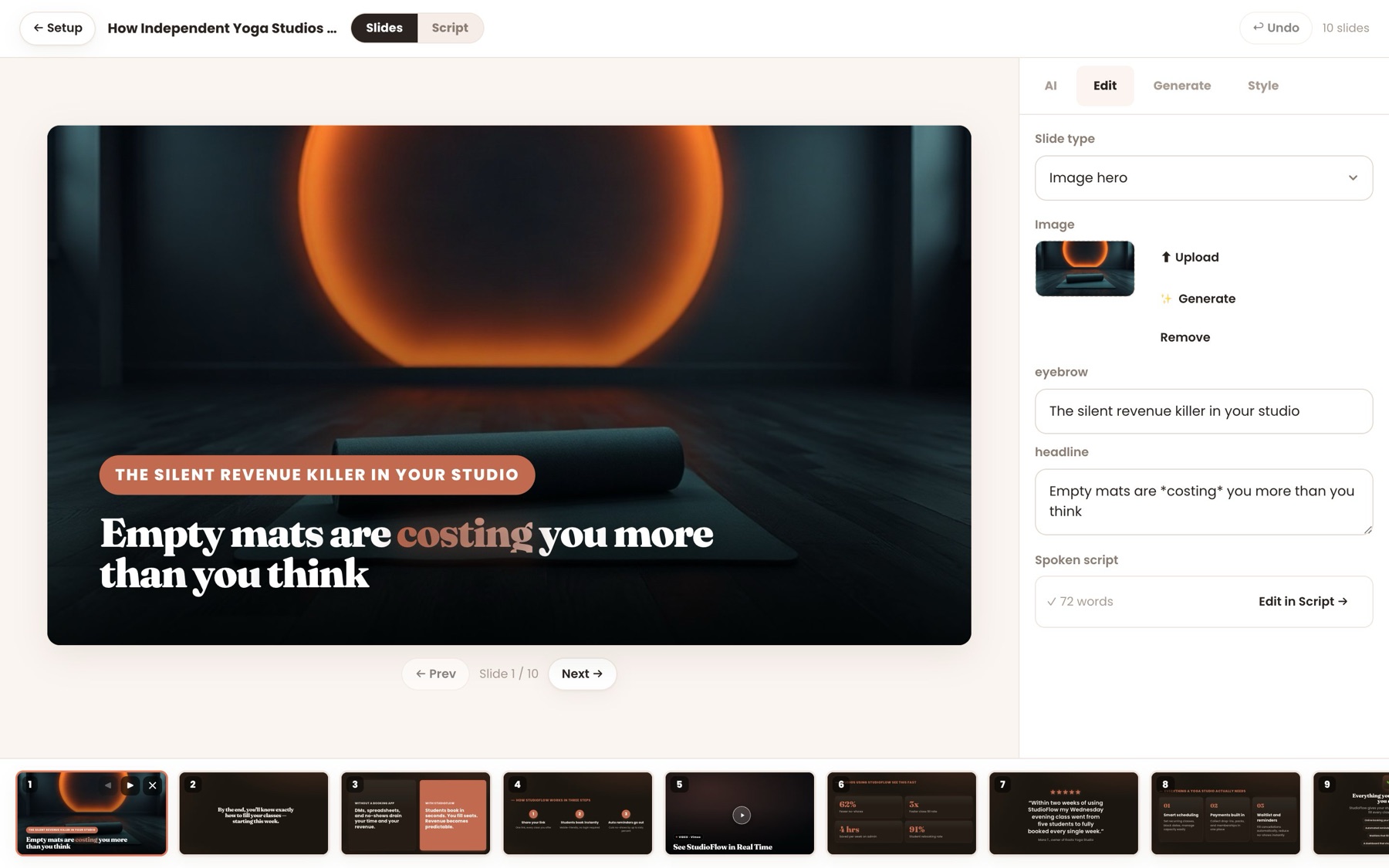
The seller says EverPitch creates a script, slides and an AI voice from the supplied input. Users can review and edit the script and slides, request changes to individual slides, apply their own logo and colors, use a PDF deck and add a linked demonstration video.
The seller lists 73 slide layouts, 11 visual styles, 30 AI voices and 87 languages. These are seller-described counts. They do not establish that every voice, language or visual style will fit a particular subject or audience.
Review the presentation as a complete piece: does the script accurately represent the source, do the slides support the spoken explanation, and does the narration communicate the intended meaning? Check any claims, examples and offer details before distribution. The supplied material does not establish error-free generation or the exact credit cost of every edit.
For related reading on checking generated educational material, see the ExpertVerse AI course preparation guide. Its product details and terms are separate from EverPitch.

Apply branding, prepare registration and schedule
After preparing the content, the seller describes choosing a registration page, adding an offer and scheduling the webinar. It lists 31 registration templates, 20 replay-page templates and 10 join-button styles, as well as reminders and calendar invitations.
Choose the page and message around what viewers are actually receiving. A registration page can explain the subject, intended audience and prepared evergreen format. If an offer appears during the session, check that its description and destination reflect the terms you intend to present.
The seller also describes client branding under the separate Agency offer, which permits users to make, run and charge for client webinars. Agency removes EverPitch attribution from specified registration, live-room and replay pages, but it does not add credits or give clients separate logins. The Agency and client-accounts guide explains the distinction from Platinum’s advertised customer accounts.
Confirm the capabilities included in your selected offer before designing a client handoff around them. The supplied information does not establish every page-editing control or client approval workflow.

What happens in the evergreen room
The seller describes scheduled evergreen sessions on a shared clock, with late joiners synchronized to the presentation. The room can show polls, handouts and an offer, sort chat, greet viewers and answer questions aloud by name using the webinar’s content.
Up to 20 spoken answers per session are described as included without a credit charge on the core offer. The answers draw on the webinar’s content, so the quality and scope of the source material matter. The supplied evidence does not establish that every answer will be accurate or that an automated answer can replace a human response in every situation.
An evergreen session is a prepared presentation, not a human presenter appearing live. Keep the description and any simulated audience disclosure clear to viewers. If real-time human discussion is essential to your event, confirm how you would provide it rather than assuming the advertised automation does so.
Replay, reminders, languages and integrations
The seller lists replay-page templates, reminders and calendar invitations among the available tools. It also says translated and re-voiced webinar versions can be linked, shown automatically in a visitor’s language and combined in analytics. The supplied material does not establish the quality of every translated version or the complete cost of creating one, so review each version before distribution.
For checkout, the seller names Stripe, PayPal, Lemon Squeezy and Razorpay. For list or workflow connections, it names Mailchimp, ActiveCampaign, Kit, GoHighLevel, GetResponse, Brevo, AWeber, Zapier, Make and n8n. A listed connection should be checked against your actual account and requirements; the supplied information does not establish every configuration or third-party charge.
For a related discussion of content rights and consent, see the ExpertVerse AI privacy and consent guide. It concerns a different product and does not define EverPitch’s terms.
Check credits and offer terms before building
The seller says creating a finished webinar costs 40 credits per minute. Commercial is advertised at $37 as a one-time payment, with 3,000 credits refreshing monthly and no monthly subscription. At the stated standard rate, the seller describes that allowance as approximately 75 finished minutes.
Extra languages and AI images use additional credits. Editing or re-voicing Done-For-You webinars also uses credits, but the complete cost of those actions is not supplied. Whether unused monthly credits roll over is unknown. The seller says existing webinars continue running when creation credits run out; new builds wait for the monthly refresh.
Optional upgrades and bundles have different terms. Ultra and MegaBundle products are advertised as renewing yearly, and the Bundle’s Ultra inclusions and credit allowance conflict across the supplied seller descriptions. Verify the selected order’s features and billing rather than assuming every advertised capability is included. Final taxes and additional transaction charges are also unknown.
Use the EverPitch credits guide to plan usage, and the pricing guide to compare one-time and recurring offers.
Final review before inviting an audience
A practical pre-session review brings the separate steps together:
- Check that you can use the source material and that the script and slides represent it accurately.
- Listen to the narration and review any translated versions.
- Confirm the schedule, registration page, offer and connected-service requirements.
- Clearly identify the prepared evergreen presentation and disclose any simulated audience if enabled.
- Review the content available to the spoken-answer feature and understand its session limit.
- Check credit usage for the intended build and arrange your own audience outreach.
The seller advertises a 30-day money-back guarantee with no reason required; the supplied offer pages describe different request routes, so check the terms for the item purchased and its order receipt. The broader EverPitch pros and cons guide weighs the workflow against its limitations.
The publication’s qualitative verdict is Tried & liked. It reflects publisher-reported experience and does not establish a test duration, coverage of every plan or upgrade, measured results or earnings.
Frequently asked questions
What can I use to start an EverPitch webinar?
The seller lists a prompt, guided form, document, sales-page link or recording as starting inputs. Recording uploads are described as supporting files up to 2 GB.
Can I edit an EverPitch webinar before scheduling it?
The seller says users can review and edit the generated script and slides, request changes to individual slides, and apply their own branding.
Is an evergreen EverPitch session presented live by a person?
The seller describes a presentation prepared in advance that identifies itself as evergreen. A simulated audience is optional and disclosed when enabled.
How many spoken answers are included?
The seller says the core offer includes up to 20 spoken answers per session without a credit charge. Answers draw on the webinar’s content.
Does EverPitch bring viewers to a webinar?
No. The seller says EverPitch does not supply traffic or run ads. The buyer is responsible for reaching an audience, and attendance or sales are not guaranteed.
How many credits does creating a webinar use?
The seller states a standard rate of 40 credits per finished webinar minute. Additional languages and AI images use credits, but the full schedule for those and other actions is not supplied.