
EverPitch review
EverPitch Review: Evergreen Webinar Features, Pricing and Buyer Fit
EverPitch is a seller-described tool for creating and scheduling evergreen webinars. It turns a topic or existing material into a script, slides and AI narration, then lets users review the presentation and prepare registration, offers and scheduled sessions. The central question for buyers is whether that workflow fits their content and audience. Buyers remain responsible for attracting viewers and evaluating their own results.
Published November 12, 2026

Verdict: Tried & liked. This qualitative verdict reflects publisher-reported experience. It does not establish a testing duration, coverage of a particular plan or upgrade, measured performance, earnings or independent testing. This EverPitch review examines the seller’s descriptions, advertised offers and material unknowns.
EverPitch at a glance: what buyers should know
EverPitch is presented as a way to produce a prepared webinar and run it on a schedule. The seller says viewers can register, join an evergreen session, see an offer and ask questions that receive spoken answers drawn from the webinar’s content.
The distinction is important: an evergreen presentation is prepared in advance. It should not be represented as a human host appearing live. The seller says the presentation identifies itself as evergreen and that any simulated audience is optional and disclosed when enabled.
Strengths
- Multiple starting inputs, with editable scripts and slides
- Scheduled sessions with seller-described spoken answers
- Commercial offer advertised as a one-time payment
Limitations
- The buyer must bring an audience; traffic and sales are not guaranteed
- Creation credits limit new builds and some features use extra credits
- Several upgrades renew yearly and Bundle details conflict
The seller advertises Commercial at $37 one-time with 3,000 credits refreshing monthly and no monthly subscription. The exact configured purchase link and final checkout charges are not supplied. For a focused assessment, read EverPitch pros and cons.

Who may find EverPitch useful
The seller identifies coaches, consultants, course creators, software businesses, local businesses and affiliate marketers as potential users. A course creator might organize an educational presentation; a software business might explain a product; a local business might prepare an introductory session for prospective customers. These are possible uses of the described workflow, not evidence that any audience will attend or buy.
Agency is presented as a separate client license for service providers who want to make and run webinars for clients. Its value depends on whether client work, branding and connected accounts matter to the buyer. It does not provide additional credits or separate client logins.
EverPitch may be less suitable for someone who needs a human presenter to respond live throughout a session, expects the software to run ads or supply traffic, or cannot work within an allowance for creating new material. It also deserves closer scrutiny if exact ongoing costs for translation, AI images or editing are essential to the decision: a complete schedule is not supplied.
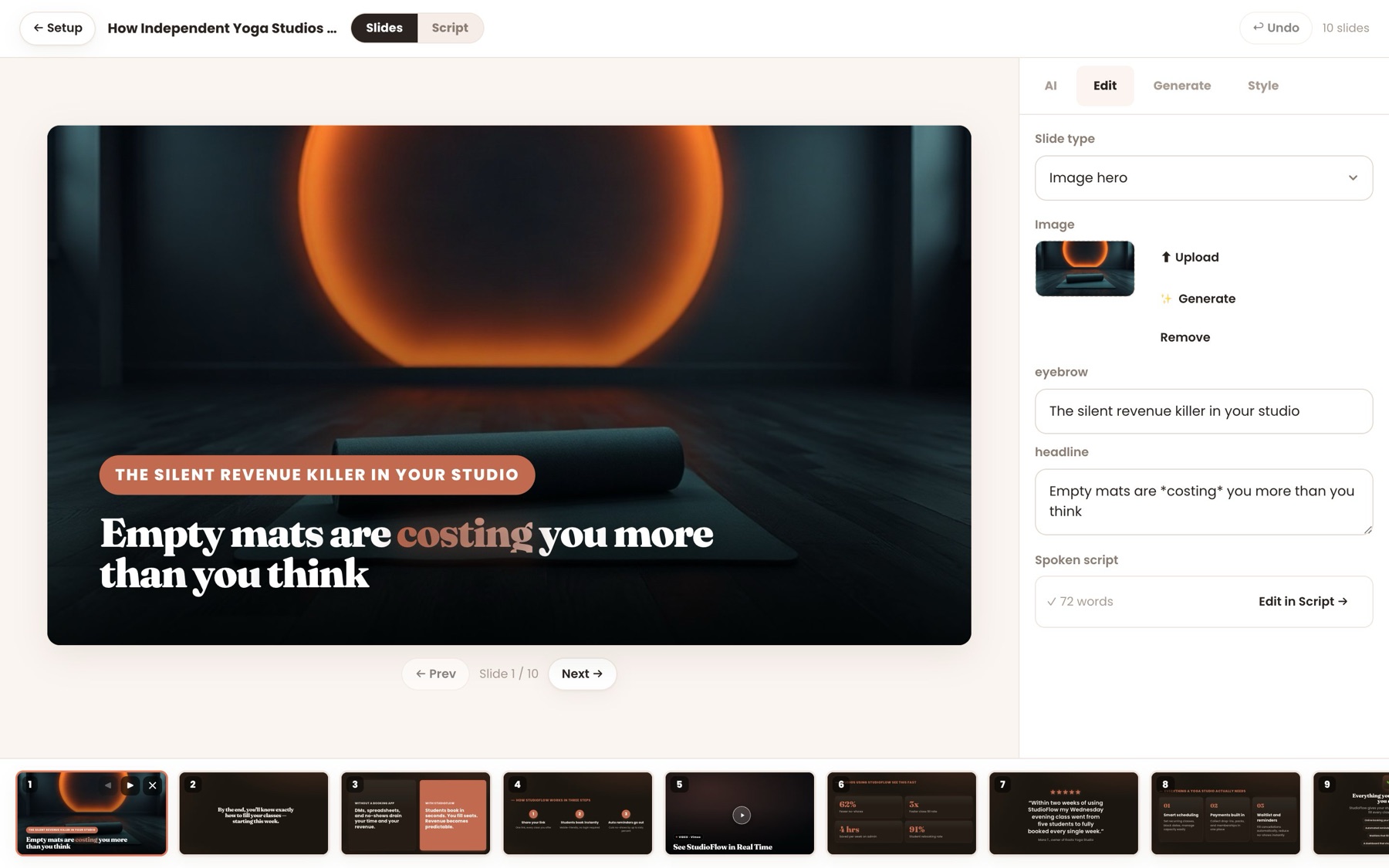
How EverPitch creates and schedules a webinar
The seller says users can begin with a prompt, guided form, document, sales-page link or recording. EverPitch then creates a script, slides and an AI voice. Users can review and edit the script and slides before choosing registration and scheduling the presentation.
Seller-described EverPitch workflow
- Provide source material
Start with a prompt, guided form, document, sales-page link or recording.
- Review the presentation
Edit the generated script and slides, and choose the voice and visual presentation.
- Prepare delivery
Choose a registration page, add an offer and schedule the webinar.
- Invite viewers
Share a link or embed a join button, then review the session setup.
The seller lists 73 slide layouts, 11 visual styles, 30 AI voices and 87 languages. It also describes applying a logo and colors, requesting changes to individual slides, using a PDF deck and adding a linked demonstration video. These are seller-described options, not an independent assessment of how every combination performs.
Prompt-based webinars are described as approximately five to 60 minutes long. Recording uploads can be up to 2 GB; the seller says a recording can play in full or be used to create a shorter version. Buyers with specific format or production requirements should confirm the current offer and interface before relying on those descriptions.
The step-by-step EverPitch workflow guide covers how these stages fit together. Users should review generated claims, slides and narration for accuracy and suitability before inviting an audience.

The evergreen room, spoken answers and audience disclosure
According to the seller, scheduled sessions run on a shared clock, with late joiners synchronized to the presentation. The room can show polls, handouts and an offer, sort chat, greet viewers and answer questions aloud by name using the webinar’s content.
The core offer is described as including up to 20 spoken answers per session without a credit charge. Those answers depend on the material in the webinar; the supplied evidence does not establish their accuracy in every situation. Review the underlying content and consider what viewers need to know about the prepared format.
The seller says the presentation identifies itself as evergreen. A simulated audience is optional and disclosed when enabled. This is a material part of the audience experience: a prepared presentation and simulated activity should be represented accurately.
The seller also describes 31 registration templates, 20 replay-page templates, 10 join-button styles, reminders and calendar invitations. These may help organize an event, but the product does not supply traffic or run ads. Registrations, attendance and purchases depend on the buyer’s offer, audience and promotion.

Strengths, limitations and a fair comparison
EverPitch’s advertised strength is combining several tasks: drafting a presentation, applying a visual style and voice, preparing registration and scheduling an evergreen session. The ability to edit scripts and slides is relevant to buyers who want to check the material before it reaches viewers.
The trade-off is that automation does not remove editorial or commercial work. A user still needs to check claims, presentation quality, the offer, disclosures and the material from which spoken answers are drawn. The seller’s promotional attendance and sales example is unverified and does not establish typical buyer outcomes.
A fair comparison with a webinar assembled from separate tools should focus on the same requirements: source material, editing control, registration, scheduling, replay, audience disclosure, integrations, usage costs and the work needed to bring viewers. The supplied evidence does not establish that EverPitch is faster, more accurate or more profitable than a named alternative.
For related reading on preparing and reviewing generated educational content, see the ExpertVerse AI course preparation guide. For another production workflow with its own usage considerations, see the Filmoyo credits guide. Those products’ features and terms do not establish EverPitch’s capabilities.
| Offer | Listed price | Offer link | What it is |
|---|---|---|---|
| Commercial (front end) | $37 | Check the front end offer | EverPitch with 3,000 credits a month, one-time payment. |
| Credit Boost (order bump) | $77/year | Add it at checkout | Raises the account to 8,000 credits a month, offered at the front end checkout. |
| DFY Webinars | $67 | Start with the front end | 10 finished, voiced webinars copied into your account. |
| Kit Vault | $47 | Start with the front end | 24 ready-made webinar kits. |
| Agency | $77 | Start with the front end | Client license, without the “Powered by EverPitch” mark. |
| Ultra | $97/year | Start with the front end | Premium AI features plus streaming. |
| Bundle | $197 | Check the bundle offer | Commercial, DFY Webinars, Kit Vault and Agency with 8,000 credits a month in one purchase; the seller says it moves to $227 during the launch. |
| MegaBundle Gold | $197/year | Start with the bundle | 10,000 credits a month and Ultra, offered after the bundle. |
| MegaBundle Platinum | $347/year | Start with the bundle | 25,000 credits a month, Ultra and 50 reseller accounts, offered after the bundle. |
EverPitch pricing: Commercial, upgrades and bundles
The following are seller-advertised prices. Final checkout totals, taxes and additional transaction charges are not established in the supplied information. The exact configured tracking URLs are not supplied, so confirm the selected offer and its terms at checkout.
| Advertised offer | Price | Billing and key distinction |
|---|---|---|
| Commercial | $37 | One-time; seller says 3,000 credits refresh monthly and no monthly subscription |
| Credit Boost order bump | $77 | Per year; advertised as raising total monthly credits to 8,000; specific renewal and cancellation details need confirmation |
| Done-For-You Webinars | $67 | One-time; no renewal |
| Webinar Vault / Kit Vault | $47 | One-time; no renewal |
| Agency | $77 | One-time; no monthly fee and no extra credits |
| Ultra | $97 | Per year; renews every 12 months unless canceled |
| Bundle | $197 early; seller says it rises to $227 during launch | One-time; no yearly renewal; exact price-change time is unknown |
| MegaBundle Gold | $197 | Per year; renews every 12 months unless canceled |
| MegaBundle Platinum | $347 | Per year; renews every 12 months unless canceled |
The seller describes Done-For-You as 10 finished, voiced webinars of about 15 minutes each. Copying them into an account uses no credits; editing or re-voicing uses credits, and client use requires Agency. The Vault is described as 24 reusable editable briefs, not finished webinars: buyers must complete bracketed fields, and builds use standard creation credits.
The EverPitch pricing guide compares the offers in more detail. Do not infer that a one-time front-end payment makes every upgrade one-time or that an advertised bundle includes every capability.
Bundle conflicts, Ultra and client-account distinctions
The seller’s itemized Bundle lists Commercial, Done-For-You Webinars, Kit Vault, Agency, 8,000 monthly credits and three bonuses. It explicitly says Ultra is sold separately. Other copy on the same Bundle page describes Ultra features as included. Do not rely on streaming, on-camera hosts, voice calls or avatar Q&A as Bundle inclusions until the seller confirms them.
A second conflict concerns credits: the Bundle offer and other sections describe 8,000 monthly credits, while a MegaBundle comparison lists the existing Bundle allowance as 10,000. The definitive allowance and intended upgrade amounts need seller confirmation.
Ultra is separately advertised at $97 per year. The seller describes host-on-camera clips, viewer voice calls, an end-of-webinar avatar Q&A, voice cloning with speaker consent and streaming. A host clip costs 150 credits; each avatar Q&A also costs 150 credits and lasts up to 10 minutes. The seller states limits of two Q&As per viewer per session, three concurrent conversations and 100 per account in any 30 days.
The seller says Gold and Platinum include Ultra and advertise total monthly allowances of 10,000 and 25,000 credits respectively, but the conflicting comparison means buyers should confirm the applicable totals. Platinum is described as providing up to 50 customer accounts, each with a separate login and 1,000 monthly credits. Agency, by contrast, adds no credits and gives clients no separate logins. The Agency and client-accounts guide explains that distinction.
The seller says Ultra cancellation takes effect after the paid year: existing host clips continue playing, while new clips, voice calls, avatar Q&A and voice cloning stop.
Credits, languages and integrations
The seller says a finished webinar costs 40 credits per minute to create. On that rate, Commercial’s 3,000 monthly credits are advertised as approximately 75 finished minutes. Existing webinars continue running if creation credits run out, while new builds wait for the monthly refresh.
- 40credits per finished minuteSeller-stated standard creation rate
- 3,000Commercial credits per monthSeller says credits refresh monthly
- 20spoken answers per sessionIncluded without a credit charge on the core offer
Additional languages and AI images use credits, and editing or re-voicing Done-For-You material also consumes credits. The complete costs for those actions are not supplied, nor is it established whether unused monthly credits roll over. The EverPitch credits guide provides a planning framework without assuming those missing rates.
The seller says translated, re-voiced versions can be linked, shown automatically in a visitor’s language and combined in analytics. It names Stripe, PayPal, Lemon Squeezy and Razorpay for checkout, and lists services including Mailchimp, ActiveCampaign, Kit, GoHighLevel, Zapier, Make and n8n for list or workflow connections. Verify the accounts, terms and any separate charges relevant to your setup; the supplied material does not establish all transaction costs.
Refund policy, launch dates and checkout checks
The seller advertises a 30-day money-back guarantee with no reason required. The main and Bundle pages say to email support within 30 days of purchase; the Done-For-You and MegaBundle pages also describe requesting a refund through the purchase platform. The seller says refunding an upgrade does not remove the underlying purchase. Review the applicable offer and order receipt for the current request route.
The supplied launch information is inconsistent. The main page says launch opens Sunday, November 15, 2026 at 8:00 PM EST; separate seller launch information says that opening is for first-webinar attendees, with the public sales page scheduled for Monday, November 16 at 11:00 AM EST and launch closing Saturday, November 21 at 11:59 PM EST. The Bundle page instead says launch week opens Wednesday, November 18 at 7:00 AM PST. Whether those schedules refer to different offers has not been confirmed.
Also verify the final price, taxes, renewal interval, cancellation method, credit allocation and features for the precise item. No exact configured affiliate tracking URLs are supplied for the main offer, Bundle or upgrades, so this review does not invent purchase destinations.
Recommendation: match the workflow to your audience and budget
EverPitch may be worth considering if you want to turn material into a prepared webinar and are comfortable reviewing the script, slides, narration and audience-facing disclosures. The $37 one-time Commercial offer is the starting point described by the seller; evaluate a yearly upgrade or bundle only after identifying the added features and credit allowance you need.
Before deciding, prepare a realistic webinar brief and check its expected finished length, required languages, intended integrations, registration process and promotion plan. Confirm whether any client work requires Agency or separate customer accounts, and resolve the Bundle conflicts with the seller. The product can support a seller-described production workflow, but it does not establish traffic, attendance or sales.
The editorial verdict remains Tried & liked: a publisher-reported qualitative assessment, not a claim of measured outcomes, a specified testing period or coverage of every offer.
Frequently asked questions
What is EverPitch?
EverPitch is described by its seller as a webinar creation and automation product. Users can start with a topic or existing material, review a generated script and slides, and schedule a prepared evergreen presentation.
Is an EverPitch evergreen webinar a live human presentation?
The seller says the presentation is prepared in advance and identifies itself as evergreen. A simulated audience is optional and disclosed when enabled.
How much does EverPitch cost?
The seller advertises Commercial at $37 one-time. Upgrades and bundles have separate prices; Ultra and MegaBundle products renew yearly. Final checkout charges and taxes are not established in the supplied material.
How many credits does a webinar use?
The seller states that a finished webinar costs 40 credits per minute to create. Extra languages, AI images and some editing or re-voicing also consume credits, but their complete costs are not supplied.
Does the Bundle include Ultra?
The itemized Bundle offer explicitly says Ultra is sold separately, while other Bundle-page copy describes Ultra features as included. Confirm the precise inclusions with the seller before buying.
Does Agency give clients separate logins?
The seller says Agency permits users to make and run webinars for clients but does not provide separate client logins or extra credits. Platinum is separately described as offering up to 50 customer accounts.
Does EverPitch provide webinar traffic?
No. The seller says the product does not supply traffic or run ads. Attendance and sales are not guaranteed.
What is the refund policy?
The seller advertises a 30-day money-back guarantee with no reason required. The supplied offer pages describe emailing support and, for some offers, requesting a refund through the purchase platform. Check the applicable terms and order receipt.