
Murage is the free desktop application featured in The AI Agency Engine. The seller presents it as a way to build and coordinate specialist AI teams around a plain-language job. The paid masterclass teaches a broader service workflow; downloading the application is a separate step.
Murage, the class and the model are three different things
The application provides the working environment. A connected model supplies AI capabilities. The masterclass is instruction about setting up teams and developing a service offer. Confusing those layers makes it easy to overestimate what a free download includes or to buy teaching when you only wanted to explore an app.
The official setup page offers Murage and its team library free. It then describes connecting a supported existing Claude, ChatGPT or Gemini subscription, or choosing Flux Router pay-as-you-go access. That is the seller’s setup description, not proof that every account type supports every workflow. Check compatibility, provider terms and spending limits for your own connection. The pricing guide separates these costs.
What specialist AI teams are meant to change
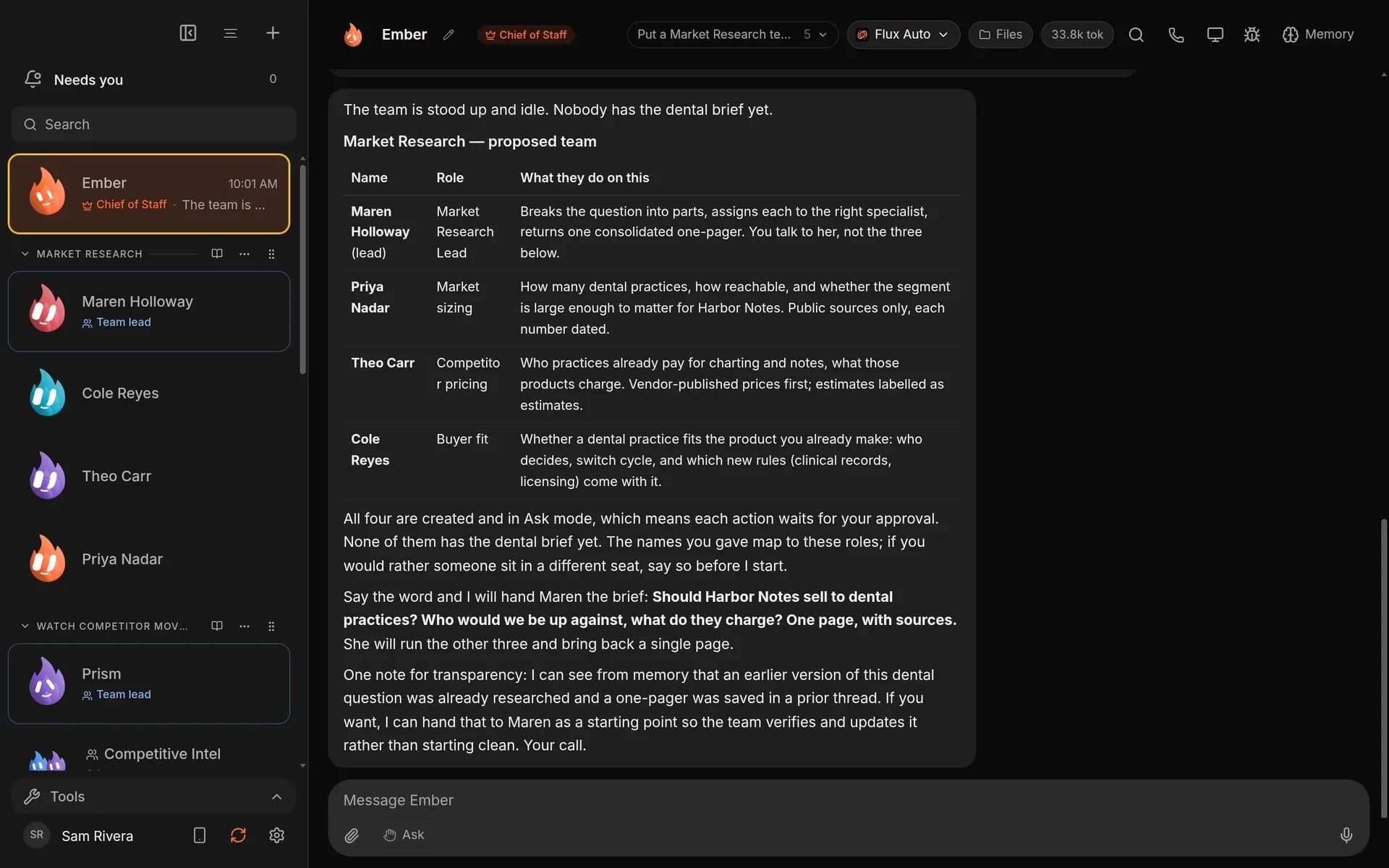
Instead of treating a broad project as one long chat, the seller’s model divides it into specialist roles. The official interface example shows a team proposal, illustrating how a brief can become a set of responsibilities. The relevant benefit is organization: different parts of a job can have distinct instructions and review points.
That does not make each generated role a qualified expert. A research role still needs sources, a writer still needs a clear brief and a reviewer can still miss mistakes. Judge the output against the original task rather than assuming that more agent names imply better work. This distinction is especially important when a polished demonstration is used in a client pitch.
The documented setup route
The official download choices cover Apple Silicon Mac, Intel Mac, Windows 64-bit and Ubuntu .deb. Choose the build for your machine, install it, connect a supported model route and bring one real task. The page describes a straightforward graphical setup rather than requiring a terminal. Its advertised short setup time is not our measured installation result.
Before adding client information, inspect what the workflow can access and what leaves the computer for a model or connected service. Start with public or synthetic practice material. Do not grant broad permissions just to make a demonstration faster. If installation or authentication fails, use the seller’s support route rather than sharing access keys or account credentials with a third party.
A sensible first task and approval workflow
For a learning exercise, ask for a draft FAQ response set using a small collection of approved policies. State which source answers each question, what the output should look like and which issues must be escalated to a person. This is an editorial example of a scoped brief, not a claim that we tested that exact workflow in Murage.
Use four checkpoints: verify the source material, inspect the proposed roles, review the generated draft and approve any external action separately. A useful team should make the responsibility chain clearer. It should not turn a draft into an automatically sent customer message simply because the language sounds confident. The beginner guide develops this preparation process.
Always-on work, security and limits
The seller’s comparison includes laptop-closed operation, agent isolation and import scanning. Treat those as configuration-dependent claims to investigate, not permission to leave an unreviewed workflow running. A local computer that is switched off cannot perform local work; any always-on arrangement needs the relevant remote execution and connection details.
Isolation and scanning can be useful safeguards, but neither establishes that every imported instruction, tool action or output is safe. Limit permissions, protect credentials and require approval for messages, purchases and changes to business systems. The Murage comparison reproduces the seller chart with its notes, rather than presenting it as independent security testing.
Who should explore Murage first?
Explore it first if your immediate question is whether a specialist-team approach makes sense for one task you already understand. Consider the paid teaching if you need help connecting that workflow to an offer, price and demonstration. These are different needs, and neither requires assuming that you must buy every optional resource.
The strongest fit is someone willing to define the job and review the output. It is a weaker fit for someone expecting an application to supply customers, legal permission or a finished business without decisions. Read the full AI Agency Engine review for the favorable case, trade-offs and schedule.
Sources checked October 27, 2026: official Murage setup, program preview and seller terms. No independent throughput, reliability or client-result measurements are claimed.
Frequently asked questions
What is Murage used for?
It is presented as a desktop workspace for building and coordinating specialist AI teams around a task. The quality and suitability of the resulting work still need human evaluation.
Do I need to buy the masterclass to download Murage?
The official setup page offers Murage free. Paid training is a separate buying decision.
Which computers have downloads?
The official page lists Apple Silicon Mac, Intel Mac, Windows 64-bit and Ubuntu .deb downloads. Check the build and current system requirements for your machine.
Does free Murage include unlimited AI usage?
No unlimited model entitlement is established by a free app download. The connected model account or usage route has its own costs and limits.