
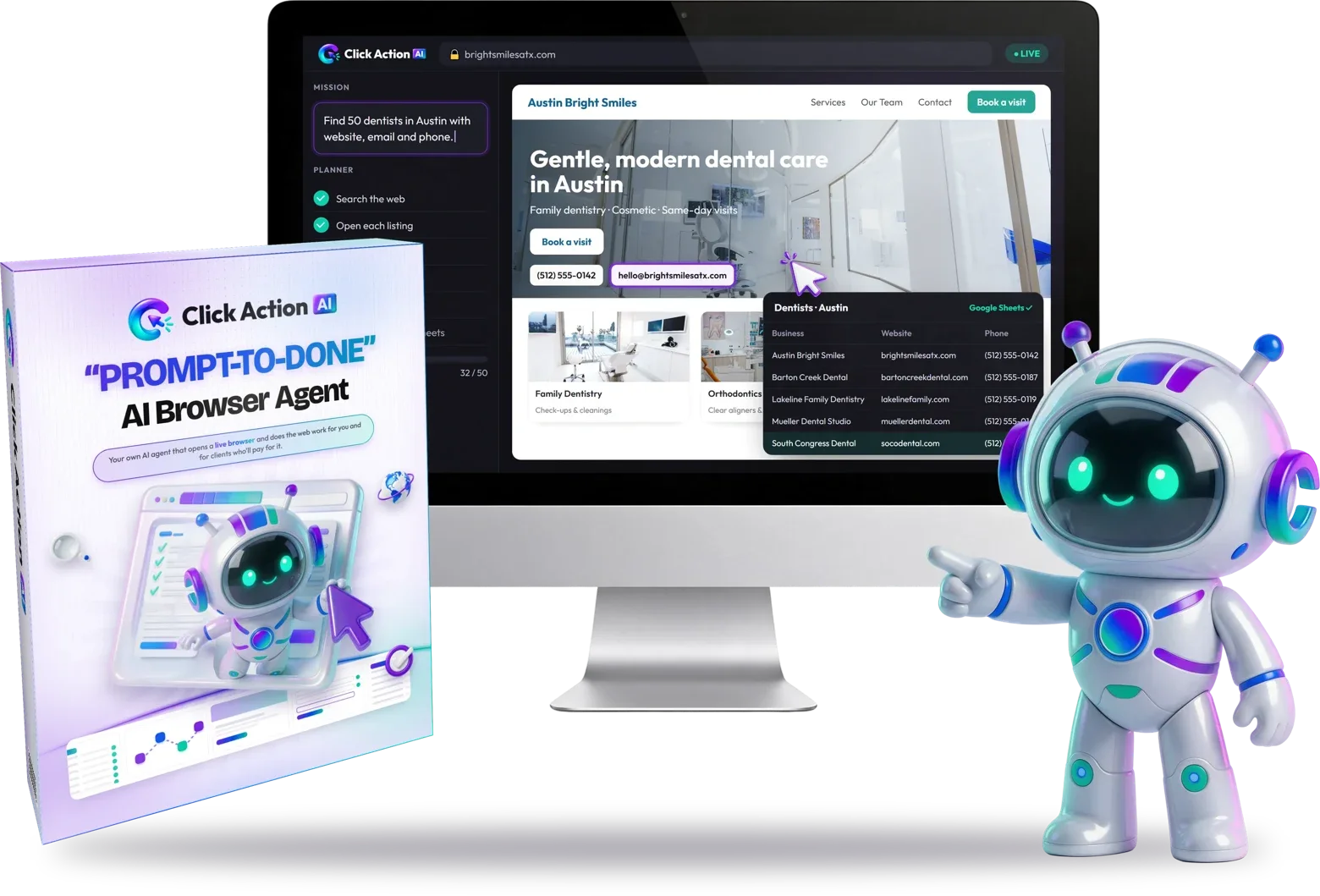
We tried Click Action AI and liked using it. Its appeal is practical: give a browser-based job a clear brief, follow its progress and review the resulting work. We recommend considering it for repeatable research and administrative tasks with a sensible human approval step—not for handing over an entire business unattended.
Quick verdict: buy for a workflow, not an income promise
Tried & liked. Click Action AI is most interesting when you already know what a useful finished deliverable looks like: a sourced lead list, a comparable pricing report or a checked set of CRM updates. The advertised cloud-browser workflow connects those jobs more directly than an answer-only chat conversation.
The important distinction is between the publisher's positive experience and the scope of the evidence. We are not claiming a measured speed advantage, a specific success rate, customer revenue or testing of every upgrade. The workflows in this hub are suggested operating plans, not logs of completed client projects.
What Click Action AI does
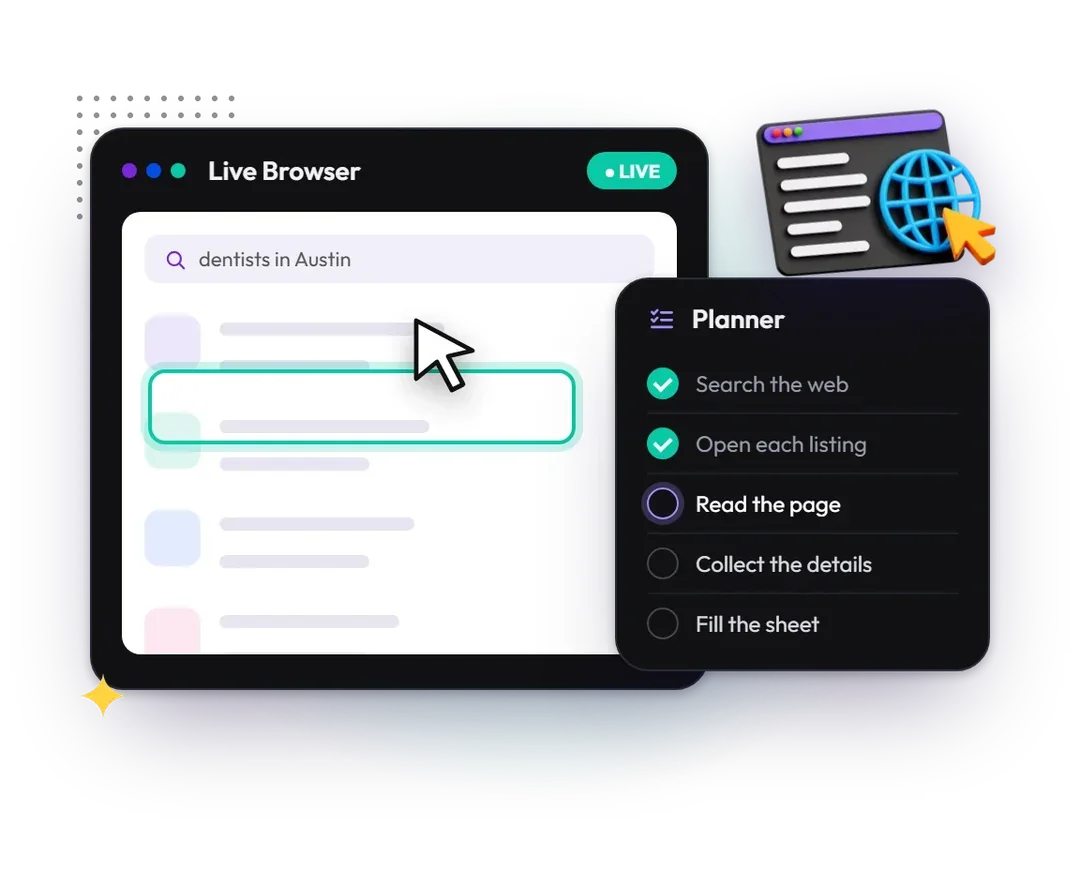
The seller describes an AI browser worker that plans a task and navigates websites from a plain-language instruction. A live view and checklist are intended to make its progress visible. Advertised uses include public web research, lead discovery, forms, CRM entry and content posting.
That combination matters because useful browser work usually has several stages. Finding a business is not the same as verifying its website, recording the source and delivering a clean table. An agent can help connect the stages, but the operator still defines acceptable sources, checks exceptions and decides when the output is ready.
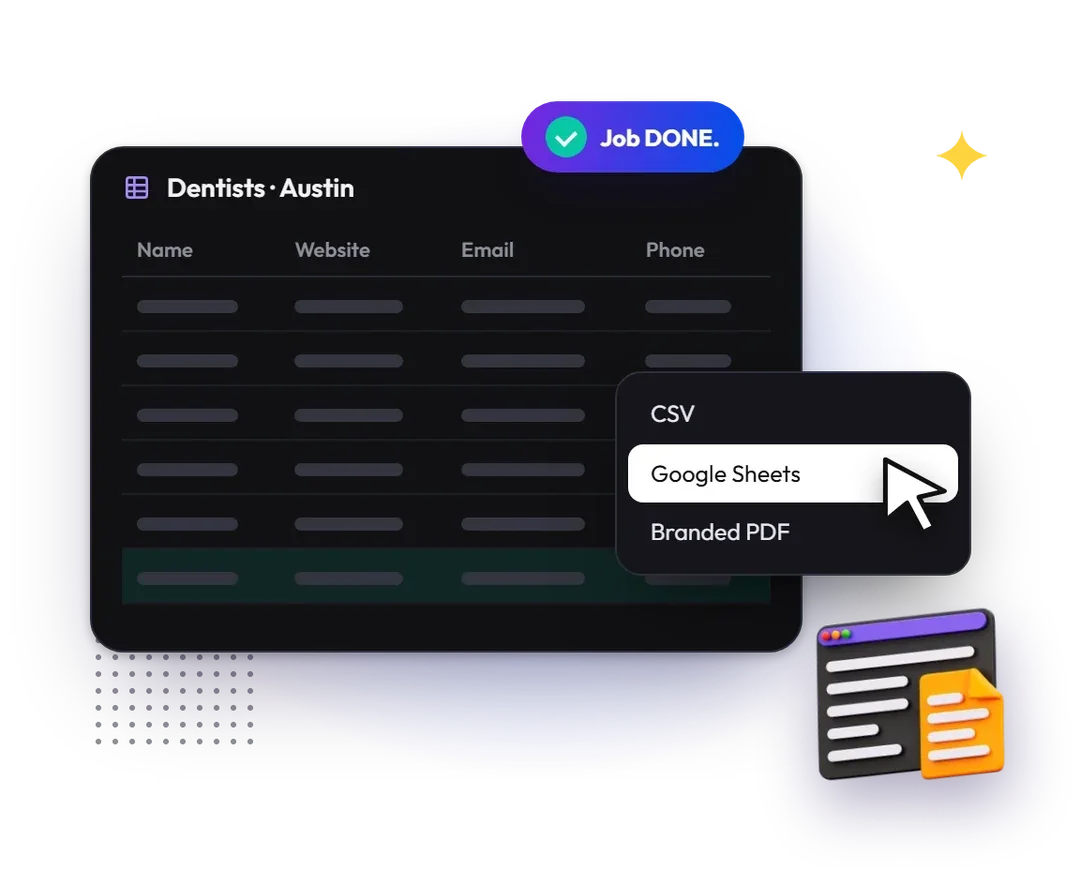
The base description lists 100 browser missions per month, 50 ready-made Gig Missions, task history and CSV, Google Sheets and branded-PDF exports. What counts as a mission, how failed attempts are metered and whether unused capacity rolls over remain buying questions. Do not interpret a monthly allowance as unlimited work.
Choose the offer around your next browser job
The supplied purchase route did not reach a product checkout when checked on October 29, 2026. Confirm availability, billing and mission rules before paying.
View the Click Action AI offerHow the browser workflow works
Begin with one bounded task and one output format. A useful brief names the allowed websites, required fields, location or audience, maximum scope and actions that must wait for your permission. Start with public, read-only research before connecting a valuable business account.
As the browser works, inspect the live checklist rather than assuming that movement means progress. A relevant page can still contain an outdated price or the wrong business. Pause if the agent follows an unrelated link, repeats a failed step or reaches an account change outside the brief.
The seller describes handover at logins, verification codes and CAPTCHA screens. This is a reason to keep a person available, not a claim that verification barriers are bypassed. Our first-mission tutorial explains a manageable starting brief; the approval guide covers more sensitive actions.
The features that make the strongest practical case
Public research with an organized output
The strongest starting use case is gathering information that you can independently inspect. For a lead list, define the business type and area, retain source URLs and leave missing contact details blank. A longer sheet is not automatically a better one. See the Lead Finder workflow and prospect-research guide for different deliverable standards.
Watching and controlling the work
A visible browser and task checklist can make exceptions easier to notice. They are not an audit certificate or proof that every action was correct. For a job inside a logged-in account, use a narrow scope and review the before-and-after state. The CRM guide, form-filling guide and WordPress publishing guide explain distinct approval points.
Deliverables beyond the chat window
Exports are useful when a colleague or client needs the work in a familiar format. CSV is good for structured transfer; a spreadsheet can support collaborative review; a PDF can present a reviewed summary. Exporting does not clean unreliable data by itself. The export checklist covers the final quality pass.
Pros and cons
What we like
- The product addresses actual browser work rather than only supplying instructions.
- Visible progress and described handover controls suit an operator-led workflow.
- Mission templates can provide a starting structure for recurring jobs.
- Structured exports and the advertised commercial license are relevant to service delivery.
- A stated monthly allowance encourages planning around a defined workload.
What to consider first
- Websites can restrict automation or require human verification.
- Public-source data can be incomplete, outdated or associated with the wrong entity.
- Logged-in writes and publishing require more care than read-only research.
- Scheduling is described as an upgrade, not an established base entitlement.
- Current checkout availability, billing and detailed usage/refund terms need confirmation.
Click Action AI prices at a glance
| Offer | Listed price | What it is | Coupon | Link |
|---|---|---|---|---|
| Front End | $36.95 | The core app: browser missions with the advertised monthly allowance and ready-made mission templates. | CAAI6$6 offadvertised by the seller | Check the Front End offer |
| Ultimate Bundle | $467 | The seller describes it as unlocking the whole product line in one purchase instead of buying upgrades one by one. | CAAI100$100 offadvertised by the seller | Check the Ultimate Bundle offer |
| Premium Bundle | $367 | A smaller bundle option listed by the seller; its exact inclusions are not confirmed. | CAAI100$100 offadvertised by the seller | Check the bundle offer |
| Pro | $67 / $57 | Several web agents on one bigger mission, coordinated by an AI supervisor. | CAAI6$6 offadvertised by the seller | Check the Pro offer |
| Automation | $97 / $87 | Scheduled and trigger-based missions that run without you starting them. | CAAI6$6 offadvertised by the seller | Check the Automation offer |
| Agency | $147 / $137 | Rights and tools to sell research and data work to clients. | CAAI6$6 offadvertised by the seller | Check the Agency offer |
| Cinematic Sites AI | $37 / $27 | A separate product: 3D-style business websites from one prompt. | CAAI6$6 offadvertised by the seller | Check Cinematic Sites AI |
| Claw Agents AI | $37 / $27 | A separate platform of AI agents for content, marketing and support. | CAAI6$6 offadvertised by the seller | Check Claw Agents AI |
| Done-For-You (DFY) | $167 | Offered in the bundle path; the seller does not detail its contents. | CAAI100$100 offadvertised by the seller | Check the DFY offer |
| Mega Bundle | $127 | Offered in the bundle path; the seller does not detail its contents. | CAAI100$100 offadvertised by the seller | Check the Mega Bundle offer |
What each plan includes
As the seller describes each plan in its launch material. The seller lists two prices for each upgrade; check which one applies on the order page.
Front EndCAAI6$6 off$36.95
One plain-English command starts a live cloud browser that plans the steps and clicks, types and moves between websites while you watch.
- 100 browser missions a month and 50 ready-made "Gig Missions"
- Lead finding, competitor and market research, price and data collection
- Form filling, CRM entry and WordPress posting
- Pauses for logins, CAPTCHAs and codes; approval before important actions
- CSV, Google Sheets and branded PDF exports
- Commercial license included
Pro (upgrade 1)$67 / $57
Several web agents work at once on one bigger mission, coordinated by an AI supervisor. The seller frames it as: the standard edition handles tasks, Pro handles projects.
- Multiple web agents at the same time
- Deeper planning and more memory on long missions
- Advanced Research Mode and smarter recovery when a step fails
- Turn your own files and lists into missions
- Advanced CSV, spreadsheet and report exports; priority processing
Automation (upgrade 2)$97 / $87
Missions run by themselves on a schedule or when set conditions are met, instead of you starting each one.
- Daily, weekly and monthly scheduled missions
- Trigger-based and chained multi-mission workflows
- Recurring competitor watch, lead research and reports
- Approval steps still pause for you
- Notifications when a job finishes, fails or needs input
Agency (upgrade 3)$147 / $137
Tools and rights to sell the same research and data work to clients.
- Commercial license for client work
- A separate workspace for each client
- Branded, client-ready reports
- Service packages, pricing guides, proposal templates and intake forms
- Managing missions for several clients in one place
Cinematic Sites AI (upgrade 4)$37 / $27
A separate product: a 3D-style business website from one text prompt.
- AI design, copywriting and images
- Google Maps lead scraper and outreach emails
- AI sales chatbot, appointment booking and payments
- Hosting, SSL, custom domain and HTML download
Claw Agents AI (upgrade 5)$37 / $27
A separate platform of AI agents for content, marketing, research, sales, support, SEO and social media.
- Specialised AI business agents in one dashboard
- Access to several AI models
- Describe the task in plain language
Premium and Ultimate BundlesCAAI100$100 off$367 / $467
The seller describes the bundles as unlocking the product line in one purchase instead of buying upgrades one by one. Its launch document does not list what separates Premium from Ultimate, so check the inclusion list on the order page.
- Coupon CAAI100 advertised for $100 off
- Followed by a Done-For-You step ($167) and a Mega Bundle step ($127), whose contents the document does not detail
Pricing and availability: what is actually established
As checked on October 29, 2026, a public offer listing displays $36.95, while the detailed seller material still marks the base price as to be announced. That is a listed figure, not a verified checkout total or evidence of one-time billing. The supplied purchase destination does not currently lead to a product-specific checkout.
The seller's current schedule advertises November 10, 2026 at 11:00 AM EST. A date is not proof that a cart is available. We retain the configured purchase link without replacing it with an invented destination, and we do not present the current route as a working checkout.
Pro, Automation, Agency and other optional packages are described separately. Choose the core task first, then check whether an upgrade adds something you genuinely need. Read the pricing and mission-limits guide before treating a list price, bundle total or advertised coupon as an accepted deal.
Who should use it—and who should skip it?
It suits a freelancer, small team or business owner who repeatedly collects public information, prepares structured research or moves approved data between web tools. It is a stronger fit when someone can review the output and take over at a permission or verification step.
Skip it if your requirement is guaranteed unattended access to every website, an established enterprise compliance specification, unlimited usage or income without finding and serving clients. A developer who needs direct browser APIs may prefer a different tool; an occasional task may not justify another purchase.
For recurring work, compare the Gig Mission planning guide with the scheduling guide. For client delivery, distinguish the commercial license from the separate business-workspace features.
Comparisons and realistic alternatives
Click Action AI is not the only product category that can operate a browser. Browser Use documents hosted agents and browser infrastructure. Skyvern documents both an app-led and a code-led route. A fair comparison looks at setup, control, deliverables, credentials and ongoing cost—not a blanket claim that every other tool can only chat.
Our browser-automation alternatives comparison helps you choose an operating model. The competitor-price report guide is a separate workflow for researching business offers, while ecommerce research focuses on product attributes and buying conditions.
Customer feedback, support and buying safety
We have not established a representative set of independent, verified buyer reviews or complaint statistics. The positive statement here is our publisher-reported experience. Promotional artwork and seller testimonials should not be converted into independent customer ratings.
The seller advertises a 30-day guarantee, but we could not verify the operative product-specific refund conditions at checkout. Obtain the applicable terms, support route, billing cycle and usage rules before paying. A support desk is available, but that does not establish a response-time guarantee. Keep your own copy of the accepted offer and receipt.
Final verdict
Tried & liked. We like the direction of Click Action AI for clear, bounded browser jobs with a reviewed deliverable. Its most useful promise is a connected working process, not an automatic business outcome.
The sensible next step is to define one job, decide how you will verify it and match that requirement to the actual offer terms. Do not buy extra capacity because a promotional example makes every task look effortless. A small, well-specified workflow is a better starting point than a large unattended mission with unclear permissions.
Frequently asked questions
Is Click Action AI legit?
It has identifiable seller materials and a public product listing. We tried it and liked the workflow. Those facts do not establish every marketing claim, guarantee future support or substitute for checking the actual purchase and refund terms.
How much does Click Action AI cost?
The checked public listing displays $36.95, but the detailed source still says base price TBA and the supplied link does not currently reach a product checkout. Confirm the final amount and billing cycle rather than treating the listing as a verified total.
Does the base plan include commercial use?
Commercial licensing is advertised with the base product. Verify the actual license before selling a service. That is different from reselling software access or assuming every agency-workspace feature is included.
Does it work on every website?
No universal compatibility is established. Sites may block automation, change their layout or require verification. A person should remain available for exceptions and important approvals.
Are the images on this page our test screenshots?
No. The supplied images are authorized official product and workflow illustrations. They identify and explain the product; they are not evidence of measured performance, client results or a completed private benchmark.
Will it make money for me?
No earnings outcome is established. Research and administrative deliverables still need quality control, an appropriate service offer and a real customer. Suggested gig prices are not payments you can expect to receive.
A practical next step
Choose the offer around your next browser job
The supplied purchase route did not reach a product checkout when checked on October 29, 2026. Confirm availability, billing and mission rules before paying.
View the Click Action AI offerExplore the Click Action AI guides
- Click Action AI Alternatives: Browser Use, Skyvern & Manual Work
Compare Click Action AI's packaged mission workflow with Browser Use, Skyvern and manual browser work by setup, control, deliverables and buying needs.
- Click Action AI Automation: Scheduling, Replay & Run Limits
Separate Click Action AI task replay from advertised Automation scheduling, then check account sessions, duplicates, mission usage and failure handling.
- Click Action AI Commercial License: What Client Work Requires
Separate Click Action AI's advertised commercial license from Agency workspaces, software resale rights and the real requirements of a client deliverable.
- Click Action AI Competitor Reports: Compare Prices Fairly
Build a Click Action AI competitor-price brief that compares equivalent plans, billing periods, fees and source dates instead of misleading headline prices.
- Click Action AI CRM Data Entry: Map, Approve and Verify Changes
Plan Click Action AI CRM updates with stable record IDs, field mapping, duplicate rules, a small approved batch and a before-and-after verification pass.
- Click Action AI for Ecommerce: Research Products Before Listing
Plan Click Action AI ecommerce research around exact variants, delivery markets, product evidence and listing checks—not unsupported winning-product claims.
- Click Action AI Exports: CSV, Google Sheets or Branded PDF?
Choose a Click Action AI export format for structured transfer, collaborative review or client presentation, with checks for sources, missing data and permissions.
- Click Action AI Form Filling: Prepare Accurate, Approved Submissions
Plan Click Action AI forms and directory tasks with approved business data, field-specific rules, submission checkpoints and saved confirmation evidence.
- Click Action AI Gig Missions: Build Repeatable Service Briefs
Adapt Click Action AI's advertised 50 Gig Missions into clear, repeatable briefs with variable inputs, approval rules and an explicit acceptance checklist.
- Click Action AI Lead Finder: Build a Usable Local Lead List
Use a clear niche, location, source and verification brief to plan Click Action AI lead research without confusing a large list with qualified prospects.
- Click Action AI Pricing 2026: Plans, Limits & Buying Checks
Understand Click Action AI's listed price, 100 monthly missions, optional upgrades and unverified coupon terms before choosing a package.
- Click Action AI Prospect Research: Turn Sources Into Context
Plan sourced Click Action AI prospect briefs that separate observed business facts, open questions and service hypotheses before any outreach.
- Click Action AI Safety: Logins, Permissions & Human Approval
Evaluate Click Action AI login handover, permission boundaries and approval checkpoints without assuming verified security certifications or universal safety.
- Click Action AI Tutorial: Plan Your First Browser Mission
Plan a small first Click Action AI mission with a clear brief, public sources, an output schema, approval boundaries and a practical quality check.
- Click Action AI WordPress Publishing: Keep a Human Approval Gate
Plan a Click Action AI WordPress workflow around approved drafts, accurate media, preview checks and explicit publish permission instead of blind posting.
Evidence and editorial scope
We tried Click Action AI and liked its workflow. That is our qualitative publisher feedback, not a measured benchmark. Features and offer details attributed to the seller were checked on October 29, 2026; the tutorials describe suggested processes, not invented test logs or client results.
Our method separates the publisher's experience, seller-described capabilities and independently inspectable offer facts. We check those against the buyer's intended task and retain limitations when the evidence is incomplete.
Official images are used with the publisher's reported permission. They are promotional and workflow illustrations, not our account screenshots. Editorial diagrams are labeled separately. The seller's support desk provides a contact route, not proof of a response time or refund entitlement.
Editorial policy and review approach · Contact the editorial team