Start your first ReferralNow campaign with one business, one understandable customer promise and one qualifying purchase event. A narrow campaign is easier to explain, rehearse and support than several overlapping incentives launched together.
This is a suggested working process based on the seller's builder and documentation, not a claim that we completed a particular timed test. Our ReferralNow review explains why we like the product; the steps below help you make its draft useful for your business.
Prepare the campaign brief
Write a brief before opening the builder. Include the business name, the customer group, the friend's benefit, the advocate's reward, the minimum qualifying purchase if any, exclusions and the person handling questions. Decide whether the reward follows a completed visit, a paid order or another clearly defined event.
Check the account allowance too. Premium's inspected order form specifies one business, three campaigns and 250 customers. The seller advertises 20 AI drafts monthly. Do not mistake a draft allowance for the number of live campaigns or assume a larger customer list will fit. The pricing guide separates those limits.
Choose a drafting route
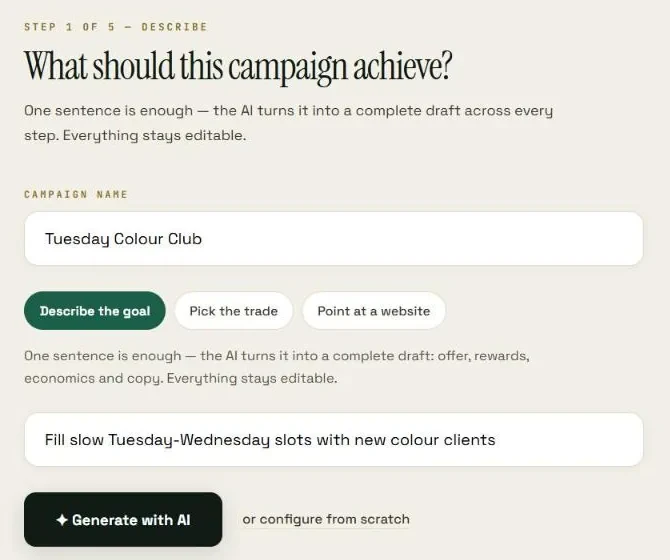
ReferralNow describes three starting routes: a plain-language goal, a trade pack or matching a website. Choose the route that gives the most accurate starting context. A website match is useful only when the site's business information and offer are current.
A generated campaign is a draft, not approval to publish an offer. Check names, prices, service descriptions and eligibility. Do not allow a generic trade example to promise a free service your business cannot provide. The trade-pack guide provides a practical editing method.
Work through the five decisions
- Describe the business and desired referral behavior in plain language.
- Set the reward, the friend benefit where relevant and the maximum affordable exposure.
- Define qualification, exclusions, timing and the refund hold.
- Edit every customer-facing promise, including the invitation, offer page and reminders.
- Review the assets and confirmation route before deliberately launching.
The seller's builder groups these decisions into a five-step flow; interface labels may vary. What matters is that the final campaign has one consistent promise across the portal, message and printed materials.
Make the reward affordable
Choose a reward you can fulfill repeatedly, not merely one that sounds generous. Store credit, a free service and cash have different costs and operating implications. Cash and connected payouts belong to the expanded Pro feature set rather than Premium's core reward options.
Use a budget ceiling and decide what happens when it is reached. Does the campaign pause? Which already-earned rewards remain owed? Explain the real promise before a customer participates. The reward and budget guide includes an illustrative margin check.
Rehearse before inviting customers
Use authorized test details and an appropriate rehearsal route; do not create fake paid transactions. Inspect the personal share route, friend claim, purchase confirmation, risk state and redemption information. For a shop, ask the staff member who will actually operate the till to explain the process back to you.
- Check that the displayed reward and qualifying event agree everywhere.
- Confirm how an unpaid or canceled order is treated.
- Check duplicate submissions or a refreshed confirmation page.
- Confirm who receives an exception and how it is resolved.
- Verify opt-out handling before using reminder messages.
The messaging guide covers permission and delivery costs, while the fraud guide covers review decisions. These are substantive launch checks, not a reason to keep rewriting a correct editorial page.
Launch one clear invitation
Once the business approves the promise and the confirmation path, launch deliberately and introduce the program to an eligible group. Use the QR/till procedure for counter activity or the ecommerce procedure for online orders.
Judge the first campaign by the full funnel rather than clicks alone. Where do people stop: sharing, claiming, completing the purchase or redeeming? Improve the weak stage rather than immediately changing every incentive and message at once.
Frequently asked questions
Does generating an AI draft publish the campaign?
The seller describes drafts and an explicit launch step. Review the offer, rules and wording before launch; a recommendation from the Strategist also creates a draft rather than an automatically live campaign.
Do I need a website?
ReferralNow advertises hosted offer pages and printed QR materials, so a business can use those customer-facing routes without building a new offer website. Purchase confirmation and campaign administration still need to be configured.
Should I start with several campaigns?
One campaign is generally easier to rehearse and diagnose. Expand when you can explain eligibility, review exceptions and measure confirmed purchases consistently.
Choose the ReferralNow offer you need
Public order-form prices checked November 1, 2026, in USD before applicable taxes. Bundle and Whitelabel renew annually; the optional $97 Bundle training add-on is separate.
ReferralNow Premium
$49 single payment
1 business · 3 campaigns · 250 customers · 1 custom domain
View ReferralNow PremiumReferralNow Bundle
$497 every 12 months
Premium, Pro, Unlimited, Agency and Reseller; 50 reseller accounts
View the ReferralNow BundleReferralNow Whitelabel
$397 every 12 months
100 customer accounts under your brand and domain
View ReferralNow WhitelabelEvidence and editorial scope
We tried ReferralNow and liked its approach. This is qualitative publisher feedback, not a numerical rating, earnings claim or benchmark covering every plan. Seller-described capabilities and public order-form terms were checked November 1, 2026. Tutorials and calculations are suggested procedures or labeled illustrations, not invented test logs.
Official product images are used with the publisher's reported permission. Screens depict the seller's demonstration business and sample data, not our account results.
- Seller product description via the Premium offer
- Seller refund policy
- Seller terms of service
- Seller privacy policy
Editorial policy and review approach · Contact the editorial team