
Quick answer: the $37 advertised entry price is not a complete operating-cost model. A customer limit, keyword limit, grid size, credit balance and external API bill measure different things. ProfitMaps shows a scan-cost preview in its vendor demonstration, but the checked materials do not establish a universal number of scans per purchase or a verified unlimited Pro allowance.
The advertised release is October 21, 2026 at 11 AM EDT. The seller's published refund policy offers a 30-day money-back guarantee and separately excludes charges incurred through a connected map-data provider account. Confirm the actual payable order before treating any pre-launch figure as final.
Disclosure: purchase links may earn us a commission at no extra cost to you. Screenshots show vendor examples, not our metered account experiment. Our sister publication is owned by us.
Four Cost Layers to Keep Separate
First is the software licence: what the selected offer lets you access. Second is platform usage, which may include scan resources, generation or export limits. Third is any external provider you connect under your own billing account. Fourth is the labour required to prepare, interpret and explain the report.
A one-time licence can coexist with finite resources or optional replenishment. An external provider's no-cost allowance can coexist with billable activity beyond it. Neither label justifies advertising unlimited scans for life. Start with our full ProfitMaps AI review, then use this article to build a workload budget rather than another upsell list.
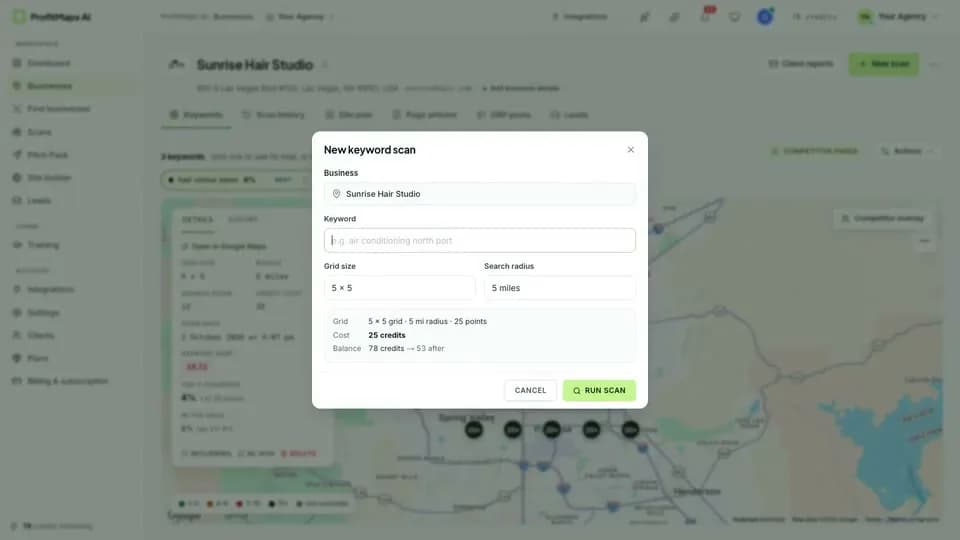
The vendor currently describes Basic as ten customers, two keywords per customer and a 5×5 grid. These are configuration limits, not proof of ten free scans each month. Pro and bundles list 9×9 grids; the name on the current page is Pro, not a documented promise of “Pro Unlimited.”
Grid Mathematics: Observations Are Not Automatically Credits
For a square layout with one observation per sampled point, the position count is side length multiplied by itself. That geometry is useful across products, but it does not define ProfitMaps' billing. A tool could meter actions, data retrieval, competitors, retries or other work separately.
| Hypothetical square layout | Sampled positions | Relative to 5×5 | ProfitMaps entitlement evidence |
|---|---|---|---|
| 3×3 | 9 | 0.36 times | Mathematical example, not confirmed available |
| 5×5 | 25 | 1 time | Advertised Basic grid |
| 7×7 | 49 | 1.96 times | Mathematical example, not confirmed Basic option |
| 9×9 | 81 | 3.24 times | Advertised Pro and bundle grid |
Do not call 81 positions eighty-one credits unless the actual meter says so. Similarly, two keywords across a 5×5 layout create fifty position-query observations, not necessarily fifty billable events in a named external API. Save the displayed charge and the completed-job record to understand the actual relationship.
Our grid audit framework explains measurement settings; the pricing and coupon guide handles the broader offer decision. Neither can supply a missing action tariff from an illustration.
A Workload Worksheet You Can Reuse
Calculate locations × keywords × positions × scan runs as an observation estimate. For example, four locations, two keywords, 25 positions and four reporting runs produce 800 observations. This is hypothetical planning arithmetic, not a measured ProfitMaps bill or guaranteed scan capacity.
Add explicit questions for rescans, failed jobs, competitor comparisons, AI analysis and exports. Ask whether an interrupted job is charged, whether a repeat uses cached data and whether balances expire or refresh. These are more useful pre-purchase questions than dividing a guessed credit balance by a guessed per-scan price.
Keep the worksheet close to the client contract. A weekly reporting promise across ten branches can require substantially more collection than a single sales audit. If the chosen plan cannot support the promised frequency or keywords, change the service scope before accepting the work.
Choose Coverage Before Increasing Grid Density
A larger grid can sample a wider area or place more points inside the same area, depending on settings. Those are different measurement choices. More points do not repair a wrong map center, an irrelevant query or a business identity mismatch.
Use a modest supported baseline for an initial question, then expand only when the business brief justifies it. Avoid daily full-area rescans without a decision they will inform. Keep settings consistent when comparing periods; changing the radius can make a result look better without changing the underlying business.
The proximity-decay guide helps interpret a strong center and weaker edges. The post-scan optimization checklist addresses fulfillment; buying more scan capacity is not itself a ranking intervention.
Google Cloud and Places: Do Not Assume the Integration Architecture
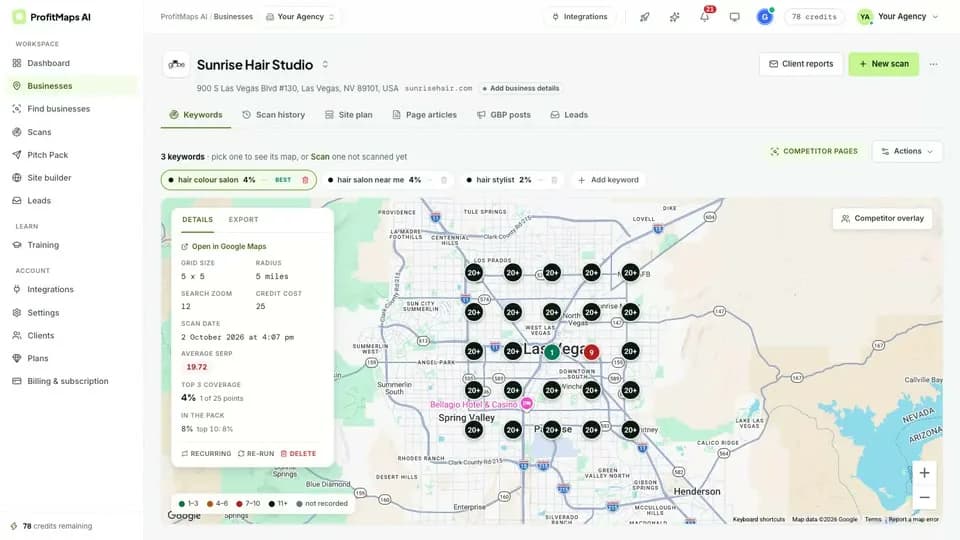
Google Maps Platform is a collection of separately documented services. Displaying a map, retrieving place details and collecting search-position observations are not interchangeable operations. A Google-branded interface does not prove which provider collects ProfitMaps ranking data or whose account is billed.
The seller's refund page mentions buyers who connect their own data key, but it does not establish that every buyer must create a Google Cloud project or that a Places key alone powers every feature. Obtain the current integration instructions: exact provider, required API, account owner, billing responsibility and what happens if the key is absent.
Google's pricing overview describes product-specific no-cost usage caps, with rates and conditions varying by service and account. The older universal $200 monthly-credit shorthand is not an appropriate blanket promise for this guide. Check the exact billable service rather than assuming “Google API” means free usage.
Do not create a billable account, grant broad permissions or paste keys into a public document just to experiment with a pre-launch product. This article is a buying checklist, not an instruction to change your production configuration.
Guardrails If You Use Your Own Provider Account
Use only the legitimate setup path and the smallest permissions the confirmed integration needs. For Google integrations, follow the official API security guidance: restrict the key appropriately to the application and APIs rather than leaving unrestricted access. Keep secrets out of screenshots, source repositories, reports and client-facing sample pages.
Review actual consumption and set the relevant quota or cost controls your provider supports. Google's budget documentation distinguishes alerts-only budgets from supported spending controls; an email alert alone does not stop usage or billing. Allow for delayed usage reporting when planning limits.
Test a small authorized workload before enabling unattended jobs. Record the platform charge and any provider-side usage separately. If those records cannot be reconciled, resolve the uncertainty before selling a recurring high-volume service or connecting a client's billing account.
What to Confirm Before Choosing Basic or Pro
Ask the seller for included resources, replenishment prices, expiry and scan/export behavior for the exact offer. Confirm Basic's customer and keyword limits, Pro's additional capabilities and whether report branding requires an upgrade. A larger grid is a capacity feature, not evidence of unlimited use.
The vendor's 30-day policy covers product purchases under its published terms, but connected data-provider charges are separate. Save the order conditions and support route. Do not assume a software refund reverses a third party's bill or refunds hours spent preparing a client report.
Our dedicated sister ProfitMaps research publication provides additional setup context, not official vendor integration instructions. Return to our main ProfitMaps assessment with a written workload and the unresolved questions above. The sensible purchase is the lowest adequate offer whose total cost you can understand, not a licence bought on an unverified “no hidden costs” promise.
Sources checked October 19, 2026: official vendor launch specifications and seller refund policy. Release and prices remain advertised rather than checkout-confirmed; product documentation does not establish our hands-on results.
Frequently Asked Questions
How many scans does the $37 offer include?
The checked vendor page establishes Basic configuration limits and a scan-cost preview, not a complete verified scan allowance or replenishment tariff. Ask for the exact included resources, action costs, failed-job handling and expiry before quoting a guaranteed report count.
Is each grid pin exactly one ProfitMaps credit?
That relationship has not been established. Square-grid point counts are mathematics, while billing depends on the actual meter and any provider charges. Do not import another product's point-per-credit model into ProfitMaps without explicit evidence.
Must I connect a Google Places API key?
The seller mentions connected data keys but the checked material does not establish a universal Google Places requirement. Confirm the exact provider and current setup path first; displaying a map does not identify every underlying data or billing service.
Does a budget alert prevent all extra API charges?
An alerts-only budget does not automatically stop usage or spending. Check applicable quota or supported spending controls, restrict credentials and monitor actual consumption. Software guarantee terms do not automatically cover charges on your separate provider account.