
A product video works harder when it helps the viewer understand a decision. A convincing opening is useful, but the explanation after it is what makes the content worth watching. This guide offers five distinct demo briefs that can give ViralForge's advertised format-analysis and variation tools a clear purpose.
These are original editorial examples, not built-in templates or measured performance results. Use accurate product information and approved assets for your own campaign. Our ViralForge AI review covers the broader workflow and our positive qualitative experience.
Disclosure: we may receive a payment when you buy through our links, at no extra cost to you. This is a commercial editorial publication, not the product creator or account service.
Brief one: explain a small, recognizable problem
Start with a problem the intended buyer can identify without a long introduction. For a hypothetical desk accessory, that could be a crowded workspace rather than a dramatic claim about productivity. Show the specific inconvenience, explain the relevant product feature and close with where someone can inspect the option.
The creative brief should name the actual scene you can show. Do not ask a generated presenter to imply a personal experience that never happened. A narrated explanation can say how a feature is intended to work without pretending to be a customer testimonial.
Prepare several openings around the same problem: a direct question, a visible detail and a short comparison. Keep the product explanation stable. This produces useful variation without turning one small campaign into unrelated scripts.
Brief two: compare use situations rather than inventing a winner
Help people choose between two legitimate use situations. A travel product might suit a short trip differently from a permanent desk setup. A software feature might help a solo creator but be unnecessary for a team with an established workflow. Explain the distinction rather than declaring one option universally best.
Use a simple three-part script: describe the first situation, describe the second and give a selection rule. Support any factual comparison with the actual specifications. Avoid fake side-by-side performance footage or prices that were not checked for the relevant product.
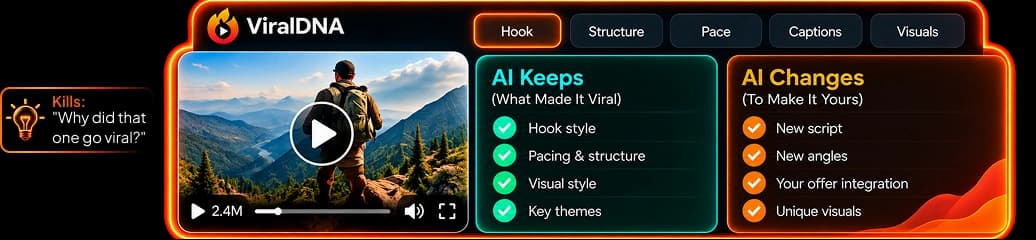
ViralDNA's advertised structure analysis can provide a format reference. Your brief supplies the substance. The strongest comparison is often one that lets an unsuitable buyer rule an option out quickly and an appropriate buyer understand why it fits.
Brief three: show what happens after the first action
An unfamiliar product can feel easier to evaluate when the video explains the process. A service business might show the booking steps; a tool might explain the sequence from input to reviewed export. Keep the process accurate and avoid presenting a promotional illustration as a recording of your own completed order.
| Demo beat | Purpose | Example instruction |
|---|---|---|
| Starting point | Orient the viewer | State what the user brings to the task |
| Main action | Explain the relevant step | Show or describe the actual control or decision |
| Review point | Set an honest expectation | Explain what needs checking |
| Next step | Continue the useful journey | Link to the matching explanation or offer |
This format is especially useful for reducing confusion. It does not need a promise that every viewer will complete the task instantly or that a generated output is automatically ready to publish.
Brief four: define who the product suits
A fit-focused video can be concise and persuasive without exaggeration. Name the audience, the recurring task and the feature that makes the product relevant. Then explain one situation where the same offer may be unnecessary. That contrast makes the recommendation specific.
For example, a hypothetical organizer could be useful to someone carrying a few essential tools daily but not someone needing a large workshop storage system. The point is to match the scale of the problem, not make the smaller product sound inadequate.
Use the same discipline for software packages. If the campaign button leads to an annual Bundle, do not narrate a one-time entry price as though it applies to that destination. Clear plan labels protect the buyer's decision and the credibility of the video.
Brief five: answer the objection that blocks understanding
Choose a genuine question, not a manufactured objection designed only to create urgency. It might concern setup, required inputs, language, compatibility or what is included. Answer it directly with the evidence available for the specific product.
If the answer is unresolved, explain what needs confirmation instead of filling the gap with a reassuring invention. In ViralForge's own current material, the entry allowance and AI-key requirement differ between sources. An accurate video about that purchase should not promise that every AI cost is included until the selected terms settle it.
For a first campaign, turn each brief into a small number of distinct variations. Our 30-video plan provides a manageable allocation rather than treating the maximum batch size as a requirement.
Review the Reel as a complete experience
Watch the first frame, captions, sound and destination together. Keep the product name readable, avoid covering important details and make the next action understandable without a long caption. Check the actual mobile preview, not just the editing view on a large display.
The official ViralForge page advertises direct Instagram scheduling alongside TikTok and YouTube. That describes the intended publishing route; confirm the connected account's available controls and publication status before treating a scheduled item as delivered.
Use our caption checklist for the final review and the bio-link funnel guide for the next page. The official feature description is the source for the advertised production and scheduling capabilities, not evidence that these five briefs have been run as a measured campaign.
Frequently Asked Questions
Are these five briefs included inside ViralForge?
They are our editorial planning examples. The official product advertises format analysis and creative variations, but we are not claiming these exact briefs are built-in templates.
Should every Reel ask someone to buy immediately?
No. The next action should match the question the video answers. A relevant explanation or suitable offer page can be a clearer next step.
Can a synthetic presenter give a customer testimonial?
Do not use a presenter to imply an experience that did not occur. Keep demonstrations, narration and genuine testimonials clearly distinguished.
Does scheduling establish successful delivery?
No. Confirm the actual publication result and the connected account's status. A calendar entry and a publicly delivered post are different states.