
A useful reference can show you how an explanation is structured without becoming the material you publish. That is the important distinction behind ViralForge's advertised format-analysis workflow. The aim is not to upload someone else's popular clip under a different name; it is to understand the creative pattern and make a new piece around your own message.
This guide provides an editorial review process, not a legal clearance opinion or proof that an automated check removes every rights issue. Read it alongside our ViralForge AI review and keep the original source, your approved brief and the final output easy to identify.
Disclosure: we may receive a payment when you buy through our links, at no extra cost to you. This is a commercial editorial publication, not the product creator or account service.
Write down what the reference teaches you
Before producing anything, describe the reference without copying its script. You might note that it opens with a common mistake, introduces a visible comparison and closes with a simple selection rule. Those observations describe a structure rather than a particular creator's expression.
Identify why the format suits your own audience. A dramatic transformation format may be engaging but inappropriate if you cannot demonstrate the claimed change. A numbered checklist can work well when you have genuinely useful checks to explain. Select the structure for the message, not merely because the reference has a large displayed view count.
Keep the source link in your internal research notes. It helps another editor understand the starting point and makes it easier to compare the new script with the reference. A public link is not, by itself, permission to reuse the footage, soundtrack or branding.
Replace the substance, not just a few words
The new brief should specify your audience, the question being answered, the product details and the next useful action. Build a fresh script from that brief. If the result follows the reference sentence by sentence, changing the presenter or swapping a product name is not much of a creative transformation.
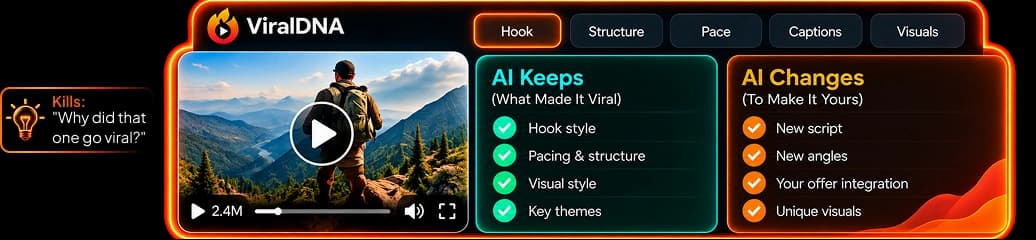
ViralDNA is advertised as analyzing hook, structure, pace and caption style, while SwapEngine rewrites around a new offer. Treat those outputs as material to review. Ask whether the examples are genuinely yours, whether the explanation is accurate and whether the conclusion makes sense without knowing the source video.
A strong adaptation can preserve a broad device such as “three checks before choosing” while using entirely different checks, demonstrations and wording. That is also more useful to viewers: the content earns attention by answering their question, not by imitating another creator's identity.
Clear the assets you actually plan to publish
List the assets that appear in the finished file: presenter, voice, music, photographs, logos, screenshots and product footage. Confirm the relevant permission or licence for each. Do not assume that the right to use an application automatically grants rights to every external image pasted into it.
| Asset or element | Practical review question | Record to retain |
|---|---|---|
| Reference footage | Is any original clip being reused? | Permission if reuse is authorized |
| Product image | Is it approved for this campaign? | Source and permitted use |
| Presenter or voice | Does the selected service allow this use? | Applicable plan and consent record |
| Music | Is commercial publication covered? | Track licence and source |
| Brand name | Is the usage accurate and appropriate? | Approved wording and client sign-off |
This is an organizational checklist, not a complete statement of rights law. Where ownership, likeness or a commercial agreement is unclear, obtain an appropriate answer before publication rather than relying on a generated file's existence.
Review claims before the batch multiplies them
A reference may contain a claim that does not apply to your product. Remove it unless you have evidence for the exact statement you intend to publish. Pay particular attention to comparative results, prices, health-related benefits, earnings examples and statements about another business.
The official product description includes a Claims & Trademark Guard. An automated flag can help identify wording to inspect; it is not a substitute for knowing whether a statement is true or whether a client has approved it. Keep the evidence close to the script rather than asking a reviewer to reconstruct it later.
For example, a fictional local-service campaign could explain the actual booking process instead of promising that every customer will achieve a dramatic outcome. Concrete process information often makes a better short video because viewers can understand what happens next.
Compare the finished output with both the brief and the reference
Watch the complete export, not just the thumbnail. Check that it contains the new script, appropriate visuals and the intended branding. Look for stray names, copied slogans, mismatched captions or an opening that promises a different story from the body.
Then compare the output with the approved brief. Does the explanation stand on its own? Is the next action appropriate? Is the presenter being used in a way the brand is comfortable with? These checks protect clarity as well as originality.
Our caption and quality-control guide covers readability in more detail. Our client approval system explains how to preserve the decision trail when someone else owns the brand or source assets.
Make originality part of the recurring workflow
Use a small asset register rather than relying on memory. Store a source, permission note and approved-use description for reusable media. Keep the final script and export beside the campaign identifier so a future revision does not accidentally restore an older unapproved element.
The official material says ViralForge builds new videos rather than reposting the original footage. That is the product's stated design; each actual output still deserves review. A distinctive script, accurate examples and suitable assets are better long-term foundations than trying to make every video resemble a familiar creator.
Read the official workflow description for the advertised analysis and generation sequence. Use the checklist above to decide whether your own finished campaign is ready for publication.
Frequently Asked Questions
Does analyzing a public video give me permission to reuse it?
No. Treat a reference link as research material. Permission for footage, music, likeness or other protected material is a separate question.
Does ViralForge say it reposts the original clip?
The current official description says it creates new versions around a new script and offer rather than reposting the original footage. Review actual outputs against that description.
Is an automated trademark or claims check enough?
No. It can flag material for review, but you still need accurate evidence and appropriate permissions for the campaign you publish.
Should I keep the reference link after publishing?
Keeping it in your internal research record helps document the creative starting point. Keep permission records and the approved final brief as well.