
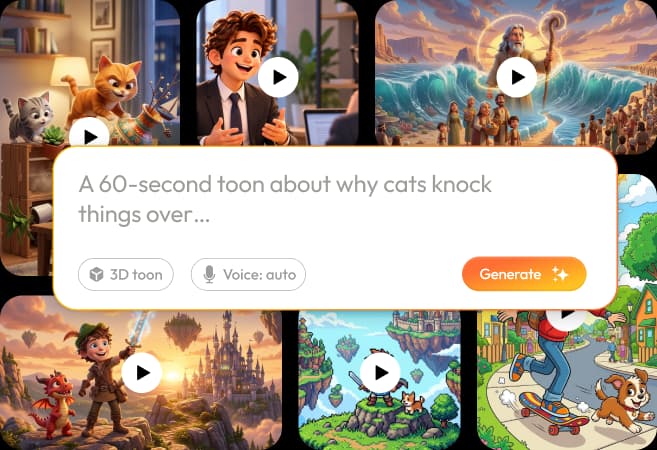
The easiest way to get value from RocketToons is to finish one understandable cartoon before attempting a complicated series. This tutorial follows the documented production stages and adds an editorial approval checklist at each point. It is a practical workflow, not a claim that every screen or control has been independently tested.
Our complete RocketToons review explains why we like the product. Here, the goal is narrower: reduce avoidable revisions by deciding what your video should communicate before asking the software to animate it.
We may earn a commission if you purchase through links on this page, at no extra cost to you.
Step 1: write a brief that can survive production
Specify who will watch, what they should understand and what happens on screen. A useful original brief might be a friendly robot helping a gardener identify why a plant is wilting. The example is a creative exercise, not one of our completed projects. Give the characters one problem to solve and the audience one takeaway.
Avoid starting with a long list of unrelated scenes. Each extra location, speaker or plot turn adds another thing to review. Set the intended format early: a vertical short, a square social post or a widescreen lesson. Do not choose a duration based on an allowance that has not been confirmed for your package.
Step 2: inspect the script and outline
The documented story writer accepts an idea or script and supports several story formats. Choose the format for the job: an explainer for a process, a short story for an event, or a quiz for a question-and-answer structure. Our script-writing guide covers that decision in more detail.
Read the outline before progressing. Remove lines that repeat the same point. Check whether each scene changes something the viewer can understand visually. Replace abstract directions such as “show success” with a concrete action, such as a character noticing a newly opened flower. Correct factual claims at this stage; polished animation will not make an incorrect explanation accurate.

Step 3: establish characters, locations and props
Create or supply assets you are allowed to use. Give each character a stable name and a compact description: appearance, clothing, proportions and an identifying detail. Keep a similar reference for the location and any important prop. If the story depends on a red watering can, it should not become a different object in the next shot.
Compare the first approved references together rather than one at a time. A cast can look individually attractive but inconsistent as a group. Use the character-consistency checklist to catch differences in scale, costume and style before they spread across the storyboard.
Step 4: approve the storyboard and spoken lines
RocketToons describes scene previews before animation. Treat them as a decision point, not decoration. Look at the order, screen direction and framing. Can someone understand the event without reading your prompt? If not, simplify the action or add the missing visual connection.
Listen to narration and character dialogue before rendering the final motion. Check names, pauses and which character says each line. If a sentence is too dense, shorten it instead of forcing a faster voice. For multilingual work, obtain a language review rather than assuming that choosing a language automatically produces an accurate translation.
Step 5: animate approved scenes and review the sequence
Generate motion only after the underlying scene is useful. A clear shot normally has one principal action and a manageable camera instruction. Asking a character to run, turn, transform and exchange several props in one short shot makes it harder to identify the cause of a weak result.
Review the sequence for identity changes, awkward movement and continuity errors. Where take history is available, compare existing versions before commissioning another generation. A retained take and a new render are different actions; one may avoid further generation while the other can consume allowance. Check the displayed credit information instead of assuming the cost.
Step 6: finish, export and archive
Review captions against the audio, particularly names, numbers and the final action. Check music under dialogue, not just during silent moments. Export a draft in the target format and watch the actual downloaded file. An attractive editor preview is not a substitute for checking the MP4 you will publish.
Save the approved export and the references needed for a future revision. The editing and export guide explains delivery checks and storage planning. For a series, write down the cast and style choices while they are fresh. Reusable production decisions are more valuable than repeatedly improvising the same setup.
Frequently asked questions
Should I animate the whole story immediately?
Approve the script, character references and scene stills first. That gives you a chance to fix meaning and continuity before spending on motion generation.
Is this a recording of our account workflow?
No. It is an editorial walkthrough based on the documented production sequence. Any official imagery is labeled; we do not present it as our private account capture.
What should my first cartoon contain?
Use one original idea, a small cast and a clear visual event. Keep it within the duration and generation allowance actually shown for your selected plan.
When should I consider an upgrade?
After identifying a specific missing capability, such as a required editing tool or scheduling function. Do not buy extra packages merely because the first outline is too complicated.
Product information and review scope
Product information checked October 24, 2026 against the official product specifications and supplied product material. Official descriptions inform the feature breakdown; they are not independent evidence of results. Where the sources disagree on package allowances, this guide preserves the uncertainty rather than choosing the most generous figure.
We tried RocketToons and liked using it. That qualitative experience is separate from package documentation and does not establish testing of every optional module, a paid-checkout verification, a measured outcome or a particular refund period. Use the official purchase route for current availability and the selected order's terms.