
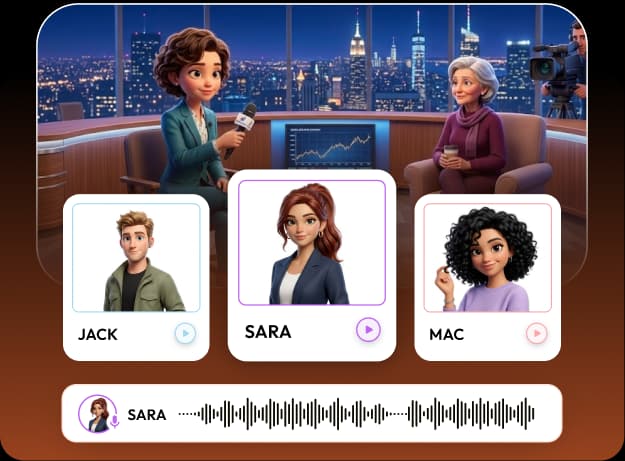
RocketToons voiceovers connect a written story to characters the audience can follow. The official overview describes natural AI voices, automatic character casting and multilingual support. It advertises 25 languages, while premium voice capabilities are separately described under Pro.
The practical benefit is a closer relationship between the cast, script and spoken lines. It does not eliminate the need to listen, correct pronunciation and review meaning. Our RocketToons review explains our positive qualitative view; this guide concentrates on the audio decisions behind a clearer film.
We may earn a commission if you purchase through links on this page, at no extra cost to you.
Decide who should speak
Start by separating narration from dialogue. A narrator can connect scenes and explain context. Characters should speak when their interaction adds something the viewer needs to hear. If every character repeats the narrator, the video becomes longer without becoming clearer.
Prepare a speaker list before generating audio. Match each name to a consistent voice and keep the list with your cast references. For recurring episodes, stable vocal identity can be as important as a stable face. Avoid adding a new voice simply because there is an unused option in the menu.
Choose a voice for clarity and tone
Listen for understandable delivery, natural phrasing and suitability for the character. A dramatic voice may work for an adventure but distract from a calm explanation. A fast reading may fit a joke but obscure a technical term. Make the selection using a representative line from your actual script.
Do not assume that a premium label guarantees a better fit. The selected package, supported voices and account controls determine the available options. The official overview describes an entry voice collection and further Pro voices, but exact inclusions should be checked in the current order. Our pricing guide keeps those package decisions separate.

Prepare the script for spoken delivery
Shorten sentences that are difficult to say naturally. Write abbreviations, names and numbers in a way that preserves their intended meaning. Listen to a test line containing the hardest pronunciation before producing the full sequence. Correct the script where possible instead of trying to rescue a confusing sentence entirely through voice settings.
Mark the reason for pauses and emphasis. A pause can signal a change in thought, not just an arbitrary gap. Check the script-writing guide for outline and dialogue preparation. Strong audio often begins with a better written line rather than a different voice.
Review character assignment and timing
Listen while watching the scene. Make sure the intended speaker receives the line and that the voice does not change unexpectedly between shots. Where the current workflow allows a line-level correction, inspect exactly what will be regenerated before executing it. Do not assume every correction requires a full film render.
The official public material describes lip-sync capabilities, but we do not claim a measured synchronization score. Check the actual output for distracting mismatches and revise shots or dialogue when necessary. Audio, facial movement and captions should support the same message rather than competing for attention.
Localize meaning, not only the voice setting
Selecting another language does not establish that the script has been accurately translated. Review terminology, cultural references and the call to action with a competent speaker. A joke, idiom or school-level explanation can require rewriting rather than a direct substitution of words.
Keep each language version linked to its own approved script and export. Check captions separately; correct spoken audio can still be accompanied by a misleading caption. Do not promise automatic multilingual success or a particular geographic reach. The capability offers a production route, while audience suitability depends on the final content and its review.
Use voices responsibly and finish the mix
Do not imitate a real person's identity or imply endorsement without appropriate permission. An available synthetic voice does not authorize misleading impersonation. If you upload recordings or other assets, confirm you have the rights required for the intended publication.
Finally, listen to the exported file on ordinary speakers and headphones. Keep background music below the point where words become hard to follow. Check the opening line, important names and the final sentence, not just the loudest moment. Our soundtrack guide and export checklist cover the remaining finishing stages.
Frequently asked questions
How many languages are advertised?
The supplied official material advertises support for 25 languages. Confirm that your required language and voice are available in the current selected plan.
Is automatic casting enough on its own?
No. Listen for correct speaker assignment, stable identity, pronunciation and timing before approving the film.
Does changing language automatically produce an accurate translation?
Do not assume that. Review the localized script, audio and captions with someone competent in the target language.
Have we benchmarked voice realism or lip-sync?
No measured benchmark was supplied. Our general positive experience does not establish a quantified audio-quality result.
Product information and review scope
Product information checked October 24, 2026 against the official product specifications and supplied product material. Official descriptions inform the feature breakdown; they are not independent evidence of results. Where the sources disagree on package allowances, this guide preserves the uncertainty rather than choosing the most generous figure.
We tried RocketToons and liked using it. That qualitative experience is separate from package documentation and does not establish testing of every optional module, a paid-checkout verification, a measured outcome or a particular refund period. Use the official purchase route for current availability and the selected order's terms.